> ## Documentation Index
> Fetch the complete documentation index at: https://docs.dash360.com/llms.txt
> Use this file to discover all available pages before exploring further.
# Admin Reports
> System-level reports for administrators: user login history and active/inactive user statistics.
 ## Overview
The Admin Reports section provides system-level reports for monitoring user accounts and activity. Use these reports to verify that users are actively using the system, identify dormant accounts, and review active versus inactive user counts.
## Permissions
Administrator role required.
***
## Navigating to a Report
The Admin Reports landing page (`/Admin/AdminReports/Index`) has a **Report** inline filter dropdown. Select a report from the dropdown to navigate to it. Currently, one report is available:
| Report | Description |
| -------------------------- | --------------------------------------------------- |
| **User Last Login Report** | Shows the last recorded activity date for each user |
***
## User Last Login Report
**URL:** `/Admin/AdminReports/UserLastLoginReport`
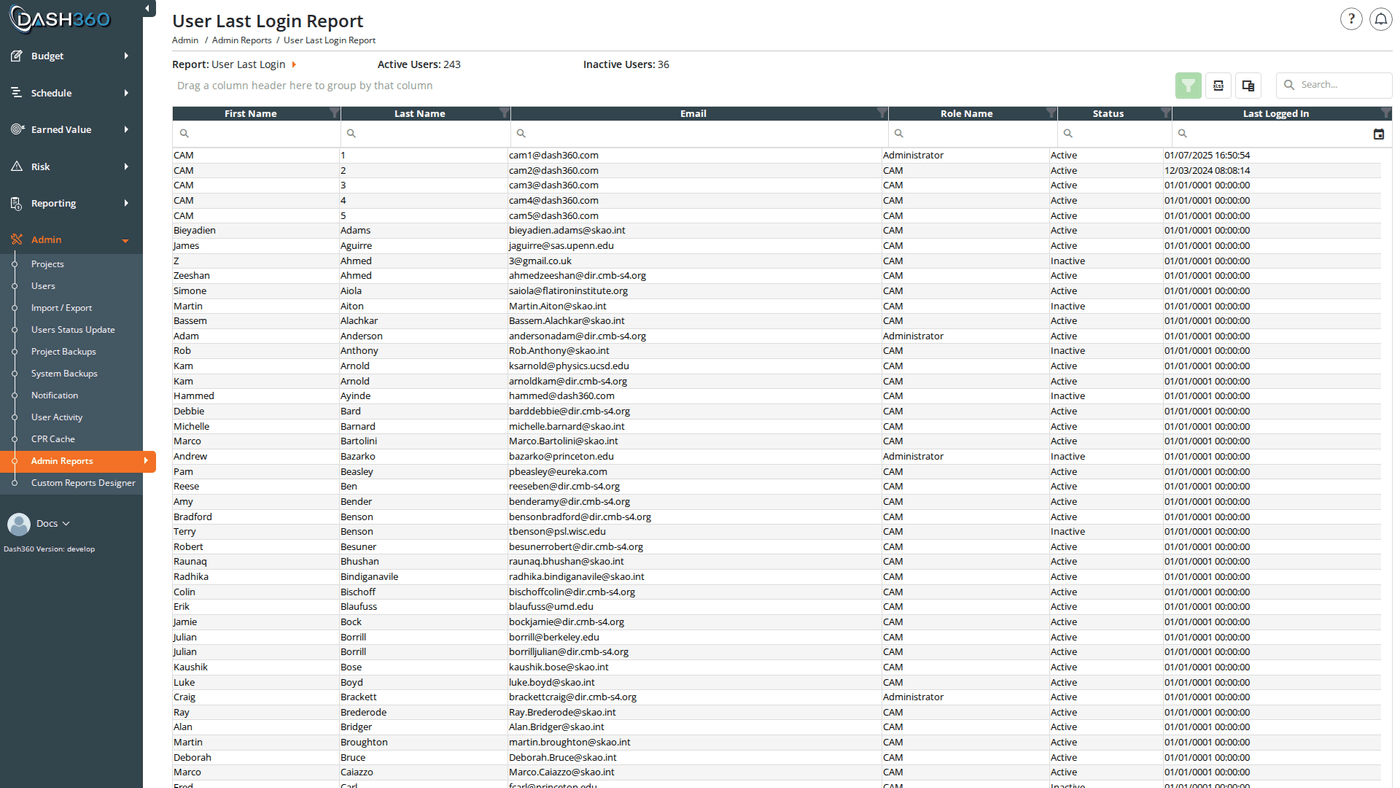
Shows when each user last had any recorded activity in Dash360. This is the primary report for identifying accounts that may be stale or should be deactivated.
### User Statistics Header
At the top of the report page, alongside the Report selector, two counters show the current state of all user accounts:
| Counter | Description |
| ------------------ | ------------------------------------------------------------------------------------------------------------------------------------------------------------------ |
| **Active Users** | Number of enabled user accounts that have logged in at least once. Enabled accounts that have never logged in (Last Logged In shows `01/01/0001`) are not counted. |
| **Inactive Users** | Number of deactivated user accounts |
These counters update each time the page loads. Use them alongside the [Users](/user-guide/admin/users) page when auditing accounts or reviewing access.
### Grid Columns
The grid shows one row per user, ordered by last name then first name:
| Column | Description |
| ------------------ | ------------------------------------------------------------------------------------------------------------------------------------------------------------------------------------------------------ |
| **First Name** | User's first name |
| **Last Name** | User's last name |
| **Email** | User's login email address |
| **Role Name** | The user's role: Administrator or CAM |
| **Status** | Active or Inactive |
| **Last Logged In** | The most recent activity date recorded for this user (MM/dd/yyyy HH:mm:ss), displayed in the configured [timezone](#timezone). Users who have never performed any action in Dash360 show `01/01/0001`. |
**Last Logged In** is derived from the user's most recent activity log entry; any recorded action (page visit, filter selection, import, etc.), not strictly a login event. In practice this closely reflects when the user was last active in the system.
### Grid Features
The grid supports a search panel, filter row (**Apply Filters** button), header filters, filter panel, grouping panel, and column chooser. Paging is set to 20 rows per page, configurable up to 100.
### Sorting and Filtering
Sort by **Last Logged In** ascending to surface users who have not been active recently. Use the **Status** header filter or filter row to narrow the grid to Active or Inactive accounts only.
### Exporting
Click the **Export** button in the grid toolbar to download the full report as **UsersLastLoginReport.xlsx**. All columns and any active filter criteria are included in the export.
***
## Timezone
The **Last Logged In** column displays timestamps converted to the timezone configured via the `Time-Zone` registry setting. All activity timestamps are stored in UTC and displayed in your local time.
***
## Overview
The Admin Reports section provides system-level reports for monitoring user accounts and activity. Use these reports to verify that users are actively using the system, identify dormant accounts, and review active versus inactive user counts.
## Permissions
Administrator role required.
***
## Navigating to a Report
The Admin Reports landing page (`/Admin/AdminReports/Index`) has a **Report** inline filter dropdown. Select a report from the dropdown to navigate to it. Currently, one report is available:
| Report | Description |
| -------------------------- | --------------------------------------------------- |
| **User Last Login Report** | Shows the last recorded activity date for each user |
***
## User Last Login Report
**URL:** `/Admin/AdminReports/UserLastLoginReport`
Shows when each user last had any recorded activity in Dash360. This is the primary report for identifying accounts that may be stale or should be deactivated.
### User Statistics Header
At the top of the report page, alongside the Report selector, two counters show the current state of all user accounts:
| Counter | Description |
| ------------------ | ------------------------------------------------------------------------------------------------------------------------------------------------------------------ |
| **Active Users** | Number of enabled user accounts that have logged in at least once. Enabled accounts that have never logged in (Last Logged In shows `01/01/0001`) are not counted. |
| **Inactive Users** | Number of deactivated user accounts |
These counters update each time the page loads. Use them alongside the [Users](/user-guide/admin/users) page when auditing accounts or reviewing access.
### Grid Columns
The grid shows one row per user, ordered by last name then first name:
| Column | Description |
| ------------------ | ------------------------------------------------------------------------------------------------------------------------------------------------------------------------------------------------------ |
| **First Name** | User's first name |
| **Last Name** | User's last name |
| **Email** | User's login email address |
| **Role Name** | The user's role: Administrator or CAM |
| **Status** | Active or Inactive |
| **Last Logged In** | The most recent activity date recorded for this user (MM/dd/yyyy HH:mm:ss), displayed in the configured [timezone](#timezone). Users who have never performed any action in Dash360 show `01/01/0001`. |
**Last Logged In** is derived from the user's most recent activity log entry; any recorded action (page visit, filter selection, import, etc.), not strictly a login event. In practice this closely reflects when the user was last active in the system.
### Grid Features
The grid supports a search panel, filter row (**Apply Filters** button), header filters, filter panel, grouping panel, and column chooser. Paging is set to 20 rows per page, configurable up to 100.
### Sorting and Filtering
Sort by **Last Logged In** ascending to surface users who have not been active recently. Use the **Status** header filter or filter row to narrow the grid to Active or Inactive accounts only.
### Exporting
Click the **Export** button in the grid toolbar to download the full report as **UsersLastLoginReport.xlsx**. All columns and any active filter criteria are included in the export.
***
## Timezone
The **Last Logged In** column displays timestamps converted to the timezone configured via the `Time-Zone` registry setting. All activity timestamps are stored in UTC and displayed in your local time.
***