> ## Documentation Index
> Fetch the complete documentation index at: https://docs.dash360.com/llms.txt
> Use this file to discover all available pages before exploring further.
# Risks
> Create and manage the risk categories and risk types that appear as classification options when users add risks in the Risk Register.
 ## Overview
The Risks admin page is where administrators define the master lists of **risk categories** and **risk types** that are available for selection when users add or edit risks in the [Risk Register](/user-guide/risk/risk-register).
* **Risk Categories** classify what area of the project a risk affects (e.g., Technical, Cost, Schedule, External).
* **Risk Types** provide a secondary classification within a category (e.g., Design Risk, Supplier Risk, Regulatory Risk).
Once created here, categories and types are assigned to individual projects via the **Risk Register Setup** tab in [Project Settings](/user-guide/admin/project-settings). They do not appear in a project's Risk Register until assigned.
## Permissions
Administrator role required.
***
## Page Layout
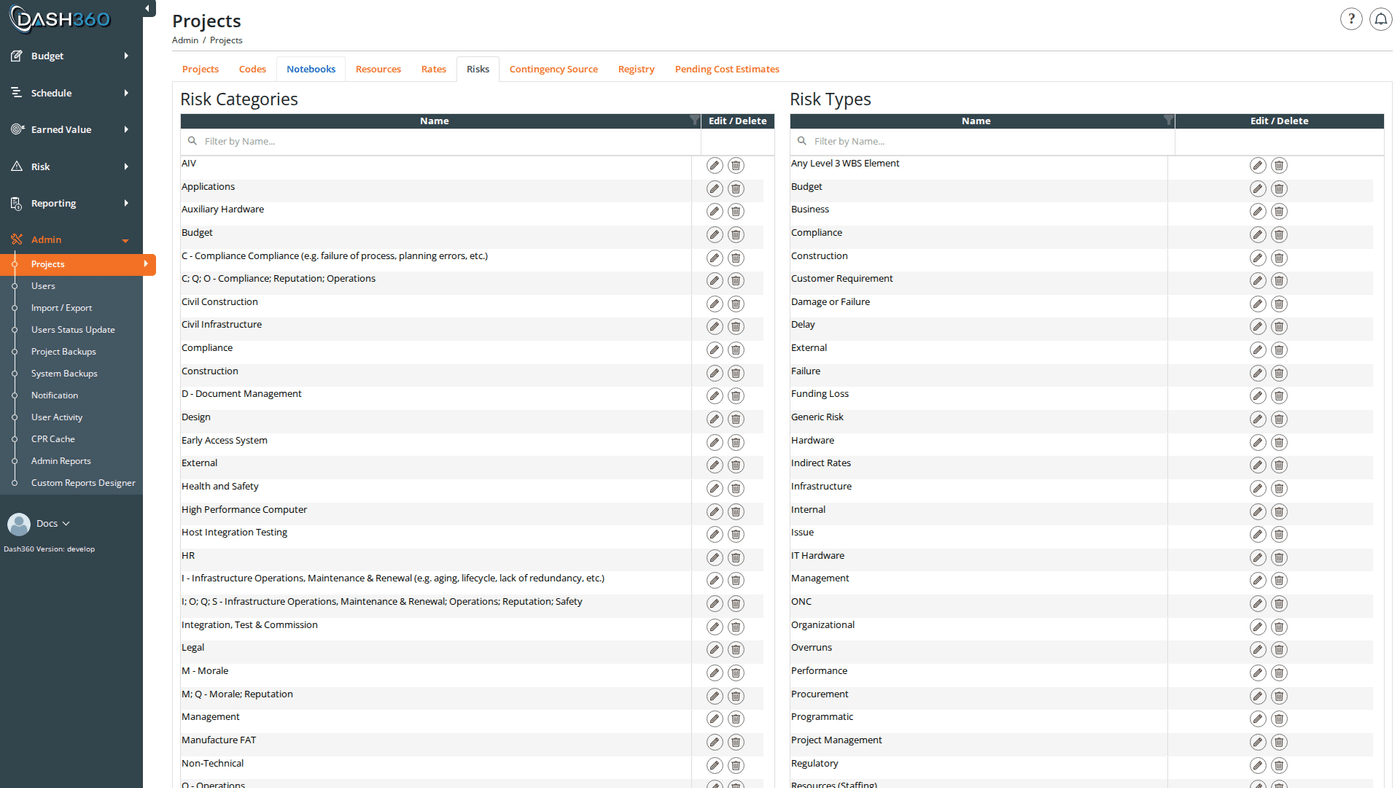
The Risks page displays two side-by-side panels:
* **Risk Categories** (left panel): the top-level classification list
* **Risk Types** (right panel): the secondary classification list
Each panel contains a DevExpress grid with a filter row for searching by name, and an **Add** button below the grid.
***
## Risk Categories
### Risk Category Fields
| Field | Description | Required |
| -------- | ------------------------------------------------------ | -------- |
| **Name** | The category label shown in the Risk Register dropdown | Yes |
### Adding a Risk Category
1. Click **Add a New Risk Category**.
2. Enter the **Name**.
3. Click **Save & Close** or **Save & Add Another** to save and immediately open a blank form for the next category.
### Editing a Risk Category
Click the **Edit** (pencil) icon on any category row. The modal reopens pre-filled with the current name. Edit the name and save.
### Deleting a Risk Category
Click the **Delete** (trash) icon on any category row. A browser confirmation dialog asks you to confirm before the deletion proceeds.
Deleting a risk category removes it from the global list. Any risks in the Risk Register that had this category assigned will lose their category value.
***
## Risk Types
### Risk Type Fields
| Field | Description | Required |
| -------- | -------------------------------------------------- | -------- |
| **Name** | The type label shown in the Risk Register dropdown | Yes |
### Adding a Risk Type
1. Click **Add a New Risk Type**.
2. Enter the **Name**.
3. Click **Save & Close** or **Save & Add Another**.
### Editing a Risk Type
Click the **Edit** (pencil) icon on any type row. The modal reopens pre-filled. Edit the name and save.
### Deleting a Risk Type
Click the **Delete** (trash) icon on any type row. A browser confirmation dialog asks you to confirm.
Deleting a risk type removes it from the global list. Any risks in the Risk Register that had this type assigned will lose their type value.
***
## Assigning to Projects
Creating a risk category or type here makes it available in the global list, but it does not automatically appear in any project's Risk Register. To make categories and types selectable for a specific project, assign them in the **Risk Register Setup** tab when editing the project in [Project Settings](/user-guide/admin/project-settings).
Risk categories and types have no Locked or Shared behavior; they are simple global lists with no per-project instances. Changes (including deletions) take effect immediately across all projects using them.
***
## Impact on the Rest of the System
| Change | Downstream Effect |
| ---------------------------- | ------------------------------------------------------------------------------------ |
| Add a category or type | Becomes available to assign to projects in Project Settings |
| Edit a category or type name | Name updates immediately in the Risk Register dropdowns for all projects using it |
| Delete a category or type | Removed from global list; existing risks that used it lose their category/type value |
***
## Overview
The Risks admin page is where administrators define the master lists of **risk categories** and **risk types** that are available for selection when users add or edit risks in the [Risk Register](/user-guide/risk/risk-register).
* **Risk Categories** classify what area of the project a risk affects (e.g., Technical, Cost, Schedule, External).
* **Risk Types** provide a secondary classification within a category (e.g., Design Risk, Supplier Risk, Regulatory Risk).
Once created here, categories and types are assigned to individual projects via the **Risk Register Setup** tab in [Project Settings](/user-guide/admin/project-settings). They do not appear in a project's Risk Register until assigned.
## Permissions
Administrator role required.
***
## Page Layout
The Risks page displays two side-by-side panels:
* **Risk Categories** (left panel): the top-level classification list
* **Risk Types** (right panel): the secondary classification list
Each panel contains a DevExpress grid with a filter row for searching by name, and an **Add** button below the grid.
***
## Risk Categories
### Risk Category Fields
| Field | Description | Required |
| -------- | ------------------------------------------------------ | -------- |
| **Name** | The category label shown in the Risk Register dropdown | Yes |
### Adding a Risk Category
1. Click **Add a New Risk Category**.
2. Enter the **Name**.
3. Click **Save & Close** or **Save & Add Another** to save and immediately open a blank form for the next category.
### Editing a Risk Category
Click the **Edit** (pencil) icon on any category row. The modal reopens pre-filled with the current name. Edit the name and save.
### Deleting a Risk Category
Click the **Delete** (trash) icon on any category row. A browser confirmation dialog asks you to confirm before the deletion proceeds.
Deleting a risk category removes it from the global list. Any risks in the Risk Register that had this category assigned will lose their category value.
***
## Risk Types
### Risk Type Fields
| Field | Description | Required |
| -------- | -------------------------------------------------- | -------- |
| **Name** | The type label shown in the Risk Register dropdown | Yes |
### Adding a Risk Type
1. Click **Add a New Risk Type**.
2. Enter the **Name**.
3. Click **Save & Close** or **Save & Add Another**.
### Editing a Risk Type
Click the **Edit** (pencil) icon on any type row. The modal reopens pre-filled. Edit the name and save.
### Deleting a Risk Type
Click the **Delete** (trash) icon on any type row. A browser confirmation dialog asks you to confirm.
Deleting a risk type removes it from the global list. Any risks in the Risk Register that had this type assigned will lose their type value.
***
## Assigning to Projects
Creating a risk category or type here makes it available in the global list, but it does not automatically appear in any project's Risk Register. To make categories and types selectable for a specific project, assign them in the **Risk Register Setup** tab when editing the project in [Project Settings](/user-guide/admin/project-settings).
Risk categories and types have no Locked or Shared behavior; they are simple global lists with no per-project instances. Changes (including deletions) take effect immediately across all projects using them.
***
## Impact on the Rest of the System
| Change | Downstream Effect |
| ---------------------------- | ------------------------------------------------------------------------------------ |
| Add a category or type | Becomes available to assign to projects in Project Settings |
| Edit a category or type name | Name updates immediately in the Risk Register dropdowns for all projects using it |
| Delete a category or type | Removed from global list; existing risks that used it lose their category/type value |
***