> ## Documentation Index
> Fetch the complete documentation index at: https://docs.dash360.com/llms.txt
> Use this file to discover all available pages before exploring further.
# Budget Reports
> A suite of cost summary, analysis, and quality check reports for reviewing estimate completeness and data integrity across your project's Work Breakdown Structure.
 ## Overview
Budget Reports are a collection of cost summary reports and quality check reports built from your project's cost estimate data. Use them to review rolled-up costs at the WBS or CAM level, verify data completeness before a review, and confirm that supporting data (basis codes, notebook entries, activity IDs, Form 1030 mappings) is fully populated.
Navigate to a report using the **Report** inline filter dropdown at the top of the page. Selecting a report updates the page title, filters, and data table in place. All reports require a project to be selected before loading.
***
## Common Features
### Display Units
All cost reports support a **Display Units** filter that scales every dollar value in the report:
| Option | Effect |
| ------- | --------------------------- |
| **\$** | Full dollars (default) |
| **\$K** | Values divided by 1,000 |
| **\$M** | Values divided by 1,000,000 |
### Section Views
Section Views are saved column configurations. A Section View stores which columns are visible, their order, and any applied grouping or sorting; so you can switch between preset layouts without reconfiguring the grid manually.
* **System views** are available to all users and are managed by administrators.
* **User views** are saved per-user from the current grid state.
The active Section View is shown in the **Section Views** filter. Selecting a different view reloads the grid with that view's column configuration.
### Grid Features
Every report grid in Budget Reports includes:
* **Search panel**: free-text search across all visible columns
* **Filter row**: per-column filter inputs with an **Apply Filters** button
* **Header filters**: click any column header to filter by specific values
* **Filter panel**: shows active filter criteria and allows clearing them
* **Column chooser**: add or remove columns using the column chooser button in the toolbar
* **Column reordering**: drag column headers to reorder
* **Column fixing**: right-click a column header to pin it to the left
* **Group panel**: drag columns to the group panel to group rows by that field
* **Export to Excel**: export button in the toolbar downloads the full report as an Excel file including all active filters
***
## Cost Summary Report
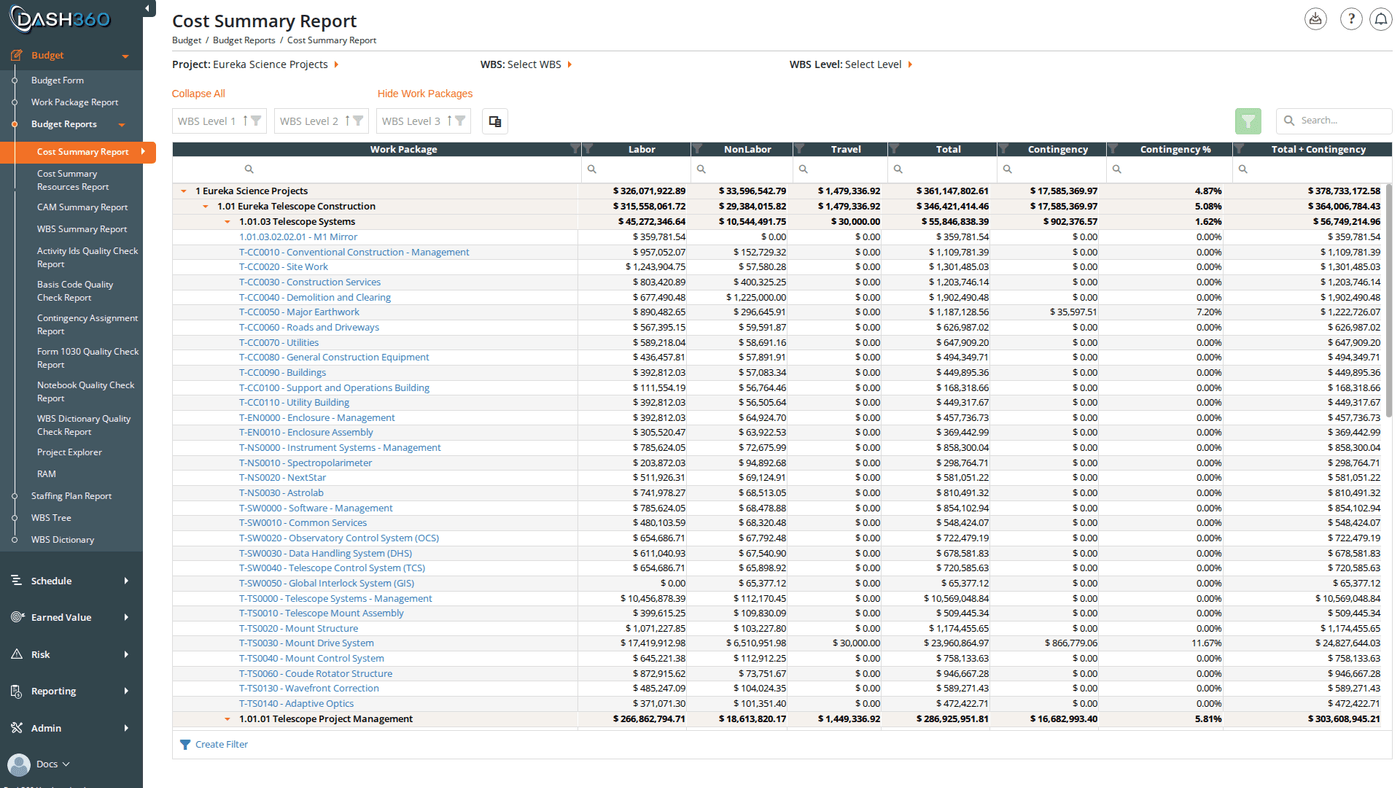
Summarizes total estimated costs organized by WBS hierarchy. Each WBS level is shown with its rolled-up cost across all work packages below it. This is the primary report for reviewing the overall estimate structure and validating cost totals at each level.
### Filters
| Filter | Description |
| ----------------- | ------------------------------------------------------------------------------------------------------------------------------------------------------------- |
| **Project** | Required. Loads the WBS structure and cost data for the selected project. |
| **WBS** | Limit the report to a specific WBS branch. Only that element and its children are shown. |
| **WBS Level** | Collapse the hierarchy to the selected depth. Selecting Level 2 shows WBS elements through Level 2 and rolls up all cost below into those rows. |
| **Cost Class** | Multi-select. Choose one or more cost classes (Budget, Actual, Forecast, or a configured cost set) to display. Multiple cost classes appear as separate rows. |
| **Display Units** | Show costs as \$, \$K, or \$M. |
| **Calendar** | Appears only when the project uses custom fiscal calendars. Selects which calendar's periods are shown in the time-phased columns. |
| **Section Views** | Apply a saved column configuration. |
### Columns
**Always visible:**
| Column | Description |
| ------------------------- | --------------------------------------------------------------------------------------------------------------------------------------------------- |
| **WBS Level 1 … Level N** | WBS hierarchy columns. Rows are grouped by level. The number of levels matches the project's WBS depth. Click a group row to expand or collapse it. |
| **Work Package** | Work package title. The lowest level of grouping. |
| **Labor** | Total labor cost for this row |
| **Non-Labor** | Total non-labor cost |
| **Travel** | Total travel cost |
| **Total** | Sum of Labor + Non-Labor + Travel |
| **Contingency** | Contingency value (shown only when contingency is configured for the project) |
| **Contingency %** | Contingency as a percentage of Total |
| **Total + Contingency** | Total cost including contingency |
**Time-phased columns (hidden by default, add via column chooser):**
| Column | Description |
| ---------------------- | ----------------------------------------------------------------------------------------------------------------------- |
| **FY20XX** | Cost in that fiscal year (one column per year in the project). Label format reflects the project's fiscal year setting. |
| **\[Calendar Period]** | When a custom calendar is selected, one column per calendar period instead of fiscal year columns. |
**Resource Result columns (hidden by default):**
| Column | Description |
| ------------------ | ------------------------------------------------------------------------- |
| **\[Result Name]** | One column per configured resource result (e.g., Direct, Overhead, G\&A). |
| **FTE** | Full-time equivalent labor units |
| **FTE (Months)** | FTE expressed in months |
**Additional columns (hidden by default):**
| Column | Description |
| ---------------------------- | ------------------------------------------------------------------------------------------- |
| **Work Package Number** | The work package identifier code |
| **Work Package Description** | The full work package description |
| **WBS Number** | The WBS element code |
| **WBS Description** | The WBS element description |
| **Cost Class** | The cost class for this row |
| **CAM** | Control Account Manager assigned to this work package |
| **EVT** | Earned Value Technique assigned to the work package |
| **Quantity** | Resource assignment quantity |
| **\[Notebook Category]** | One column per configured notebook category showing whether the notebook entry is populated |
| **\[Signature Step N]** | One column per configured signature step showing signoff status |
| **WBS Links** | Hyperlinks attached to the WBS element |
| **Work Package Links** | Hyperlinks attached to the work package |
***
## Cost Summary Resources Report
The same WBS cost hierarchy as the Cost Summary Report, but broken out by resource code and resource type within each work package. Use this when you need to see not just how much is estimated by WBS element, but which resources drive the cost at each level.
## Overview
Budget Reports are a collection of cost summary reports and quality check reports built from your project's cost estimate data. Use them to review rolled-up costs at the WBS or CAM level, verify data completeness before a review, and confirm that supporting data (basis codes, notebook entries, activity IDs, Form 1030 mappings) is fully populated.
Navigate to a report using the **Report** inline filter dropdown at the top of the page. Selecting a report updates the page title, filters, and data table in place. All reports require a project to be selected before loading.
***
## Common Features
### Display Units
All cost reports support a **Display Units** filter that scales every dollar value in the report:
| Option | Effect |
| ------- | --------------------------- |
| **\$** | Full dollars (default) |
| **\$K** | Values divided by 1,000 |
| **\$M** | Values divided by 1,000,000 |
### Section Views
Section Views are saved column configurations. A Section View stores which columns are visible, their order, and any applied grouping or sorting; so you can switch between preset layouts without reconfiguring the grid manually.
* **System views** are available to all users and are managed by administrators.
* **User views** are saved per-user from the current grid state.
The active Section View is shown in the **Section Views** filter. Selecting a different view reloads the grid with that view's column configuration.
### Grid Features
Every report grid in Budget Reports includes:
* **Search panel**: free-text search across all visible columns
* **Filter row**: per-column filter inputs with an **Apply Filters** button
* **Header filters**: click any column header to filter by specific values
* **Filter panel**: shows active filter criteria and allows clearing them
* **Column chooser**: add or remove columns using the column chooser button in the toolbar
* **Column reordering**: drag column headers to reorder
* **Column fixing**: right-click a column header to pin it to the left
* **Group panel**: drag columns to the group panel to group rows by that field
* **Export to Excel**: export button in the toolbar downloads the full report as an Excel file including all active filters
***
## Cost Summary Report
Summarizes total estimated costs organized by WBS hierarchy. Each WBS level is shown with its rolled-up cost across all work packages below it. This is the primary report for reviewing the overall estimate structure and validating cost totals at each level.
### Filters
| Filter | Description |
| ----------------- | ------------------------------------------------------------------------------------------------------------------------------------------------------------- |
| **Project** | Required. Loads the WBS structure and cost data for the selected project. |
| **WBS** | Limit the report to a specific WBS branch. Only that element and its children are shown. |
| **WBS Level** | Collapse the hierarchy to the selected depth. Selecting Level 2 shows WBS elements through Level 2 and rolls up all cost below into those rows. |
| **Cost Class** | Multi-select. Choose one or more cost classes (Budget, Actual, Forecast, or a configured cost set) to display. Multiple cost classes appear as separate rows. |
| **Display Units** | Show costs as \$, \$K, or \$M. |
| **Calendar** | Appears only when the project uses custom fiscal calendars. Selects which calendar's periods are shown in the time-phased columns. |
| **Section Views** | Apply a saved column configuration. |
### Columns
**Always visible:**
| Column | Description |
| ------------------------- | --------------------------------------------------------------------------------------------------------------------------------------------------- |
| **WBS Level 1 … Level N** | WBS hierarchy columns. Rows are grouped by level. The number of levels matches the project's WBS depth. Click a group row to expand or collapse it. |
| **Work Package** | Work package title. The lowest level of grouping. |
| **Labor** | Total labor cost for this row |
| **Non-Labor** | Total non-labor cost |
| **Travel** | Total travel cost |
| **Total** | Sum of Labor + Non-Labor + Travel |
| **Contingency** | Contingency value (shown only when contingency is configured for the project) |
| **Contingency %** | Contingency as a percentage of Total |
| **Total + Contingency** | Total cost including contingency |
**Time-phased columns (hidden by default, add via column chooser):**
| Column | Description |
| ---------------------- | ----------------------------------------------------------------------------------------------------------------------- |
| **FY20XX** | Cost in that fiscal year (one column per year in the project). Label format reflects the project's fiscal year setting. |
| **\[Calendar Period]** | When a custom calendar is selected, one column per calendar period instead of fiscal year columns. |
**Resource Result columns (hidden by default):**
| Column | Description |
| ------------------ | ------------------------------------------------------------------------- |
| **\[Result Name]** | One column per configured resource result (e.g., Direct, Overhead, G\&A). |
| **FTE** | Full-time equivalent labor units |
| **FTE (Months)** | FTE expressed in months |
**Additional columns (hidden by default):**
| Column | Description |
| ---------------------------- | ------------------------------------------------------------------------------------------- |
| **Work Package Number** | The work package identifier code |
| **Work Package Description** | The full work package description |
| **WBS Number** | The WBS element code |
| **WBS Description** | The WBS element description |
| **Cost Class** | The cost class for this row |
| **CAM** | Control Account Manager assigned to this work package |
| **EVT** | Earned Value Technique assigned to the work package |
| **Quantity** | Resource assignment quantity |
| **\[Notebook Category]** | One column per configured notebook category showing whether the notebook entry is populated |
| **\[Signature Step N]** | One column per configured signature step showing signoff status |
| **WBS Links** | Hyperlinks attached to the WBS element |
| **Work Package Links** | Hyperlinks attached to the work package |
***
## Cost Summary Resources Report
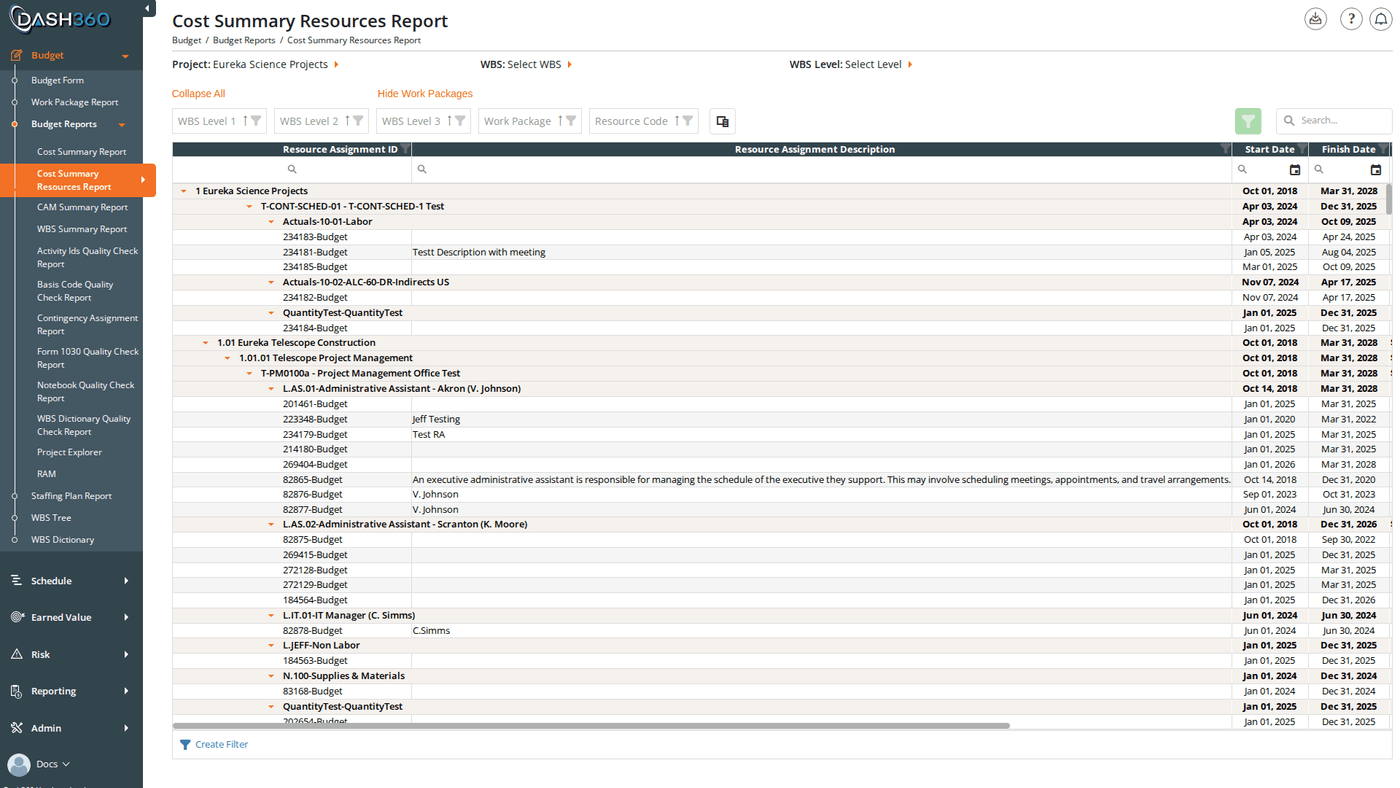
The same WBS cost hierarchy as the Cost Summary Report, but broken out by resource code and resource type within each work package. Use this when you need to see not just how much is estimated by WBS element, but which resources drive the cost at each level.
 ### Filters
Same filters as the Cost Summary Report: **Project**, **WBS**, **WBS Level**, **Cost Class** (multi-select), **Display Units**, **Calendar**, **Section Views**.
### Columns
The same column structure as the Cost Summary Report, with the addition of:
| Column | Description |
| ----------------- | ------------------------------ |
| **Resource Code** | The resource code for this row |
| **Resource Type** | Labor, Non-Labor, or Travel |
***
## CAM Summary Report
Summarizes estimated costs organized by Control Account Manager (CAM) rather than by WBS. Use this when you need to review each CAM's total scope and cost responsibility in one view.
The report includes the same charts and tables as the WBS Summary Report (cost by estimate type (Parametric, Analogy, Engineering, etc.), cost by resource type (Labor, Non-Labor, Travel), cost by cost type, and FTE analysis) but grouped by CAM rather than WBS element.
### Filters
Same filters as the Cost Summary Report: **Project**, **WBS**, **WBS Level**, **Cost Class** (multi-select), **Display Units**, **Calendar**, **Section Views**.
### Columns
The same column structure as the Cost Summary Report, with the addition of:
| Column | Description |
| ----------------- | ------------------------------ |
| **Resource Code** | The resource code for this row |
| **Resource Type** | Labor, Non-Labor, or Travel |
***
## CAM Summary Report
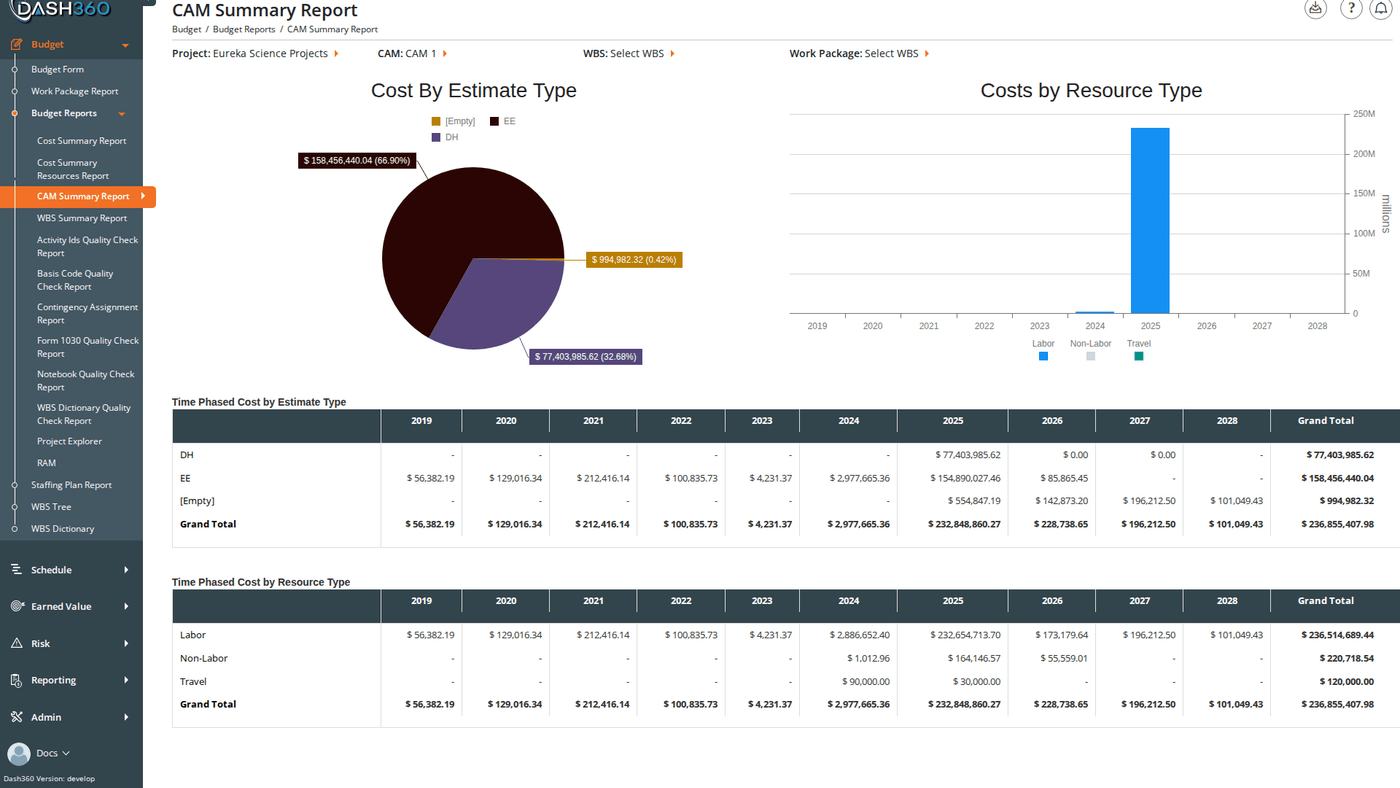
Summarizes estimated costs organized by Control Account Manager (CAM) rather than by WBS. Use this when you need to review each CAM's total scope and cost responsibility in one view.
The report includes the same charts and tables as the WBS Summary Report (cost by estimate type (Parametric, Analogy, Engineering, etc.), cost by resource type (Labor, Non-Labor, Travel), cost by cost type, and FTE analysis) but grouped by CAM rather than WBS element.
 ### Filters
| Filter | Description |
| ----------------- | -------------------------------------------------- |
| **Project** | Required |
| **CAM** | Limit to a specific control account manager |
| **WBS** | Further filter within the selected CAM's scope |
| **Work Package** | Filter to a specific work package |
| **Cost Class** | Budget, Actual, Forecast, or a configured cost set |
| **Display Units** | \$, \$K, or \$M |
| **Section Views** | Apply a saved column configuration |
***
## WBS Summary Report
A comprehensive visual summary of the project estimate broken down by WBS element. Includes multiple charts and supporting data tables:
* **Cost by Estimate Type**: breaks down the estimate by methodology (Parametric, Analogy, Engineering, Grassroots, etc.)
* **Cost by Resource Type**: Labor, Non-Labor, Travel split
* **Cost by Cost Type**: breaks cost into configured cost types
* **FTE Analysis**: full-time equivalent labor across WBS elements
* **Stacked cost subtotals**: rolled-up totals at each WBS level
### Filters
| Filter | Description |
| ----------------- | -------------------------------------------------- |
| **Project** | Required |
| **CAM** | Limit to a specific control account manager |
| **WBS** | Further filter within the selected CAM's scope |
| **Work Package** | Filter to a specific work package |
| **Cost Class** | Budget, Actual, Forecast, or a configured cost set |
| **Display Units** | \$, \$K, or \$M |
| **Section Views** | Apply a saved column configuration |
***
## WBS Summary Report
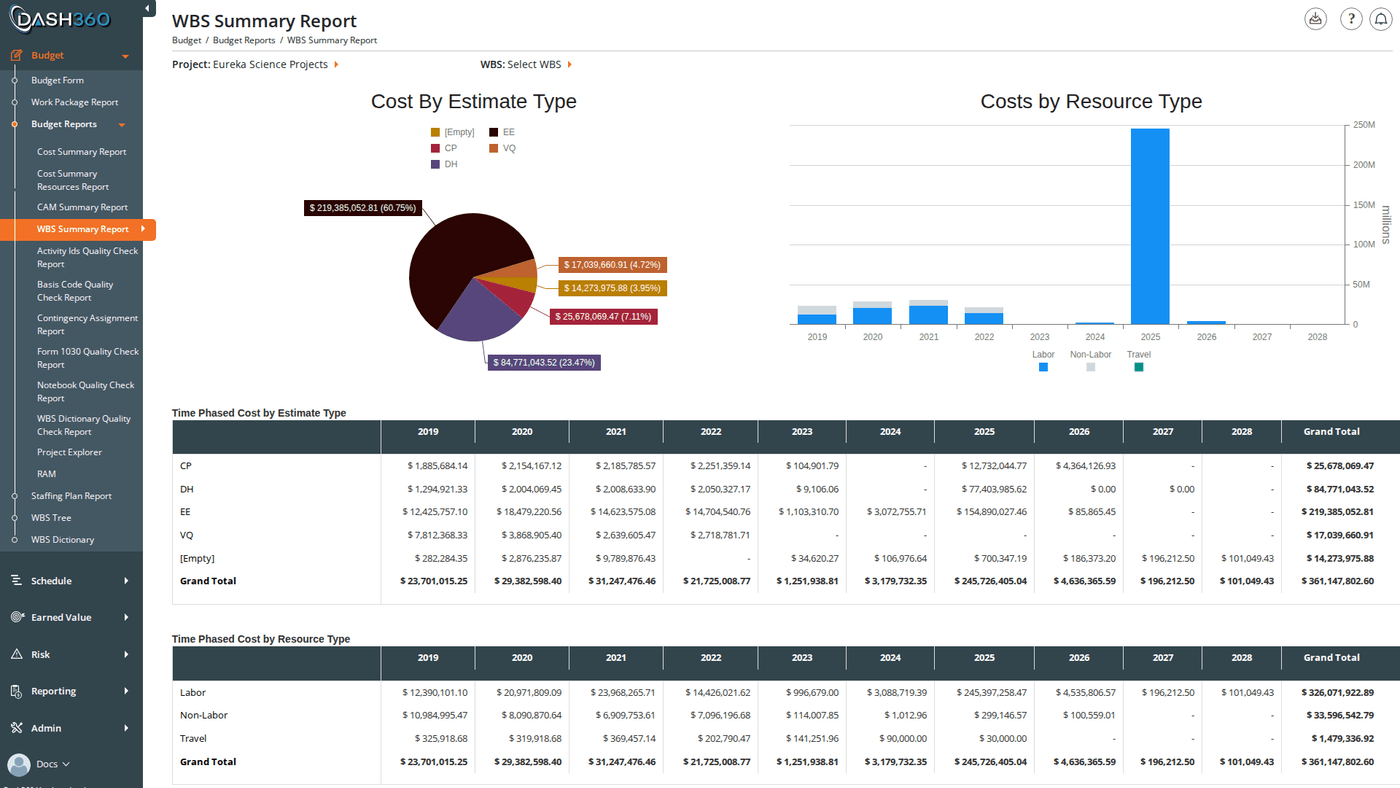
A comprehensive visual summary of the project estimate broken down by WBS element. Includes multiple charts and supporting data tables:
* **Cost by Estimate Type**: breaks down the estimate by methodology (Parametric, Analogy, Engineering, Grassroots, etc.)
* **Cost by Resource Type**: Labor, Non-Labor, Travel split
* **Cost by Cost Type**: breaks cost into configured cost types
* **FTE Analysis**: full-time equivalent labor across WBS elements
* **Stacked cost subtotals**: rolled-up totals at each WBS level
 ### Filters
| Filter | Description |
| ----------------- | ------------------------------------------------------------------------------------------------------------------- |
| **Project** | Required |
| **WBS** | Limit to a specific WBS branch |
| **Cost Class** | Budget, Actual, Forecast, or a configured cost set |
| **Display Units** | \$, \$K, or \$M |
| **Calendar** | Selects which custom calendar to use for time-phased breakdowns (shown only when the project uses custom calendars) |
***
## Activity IDs Quality Check Report
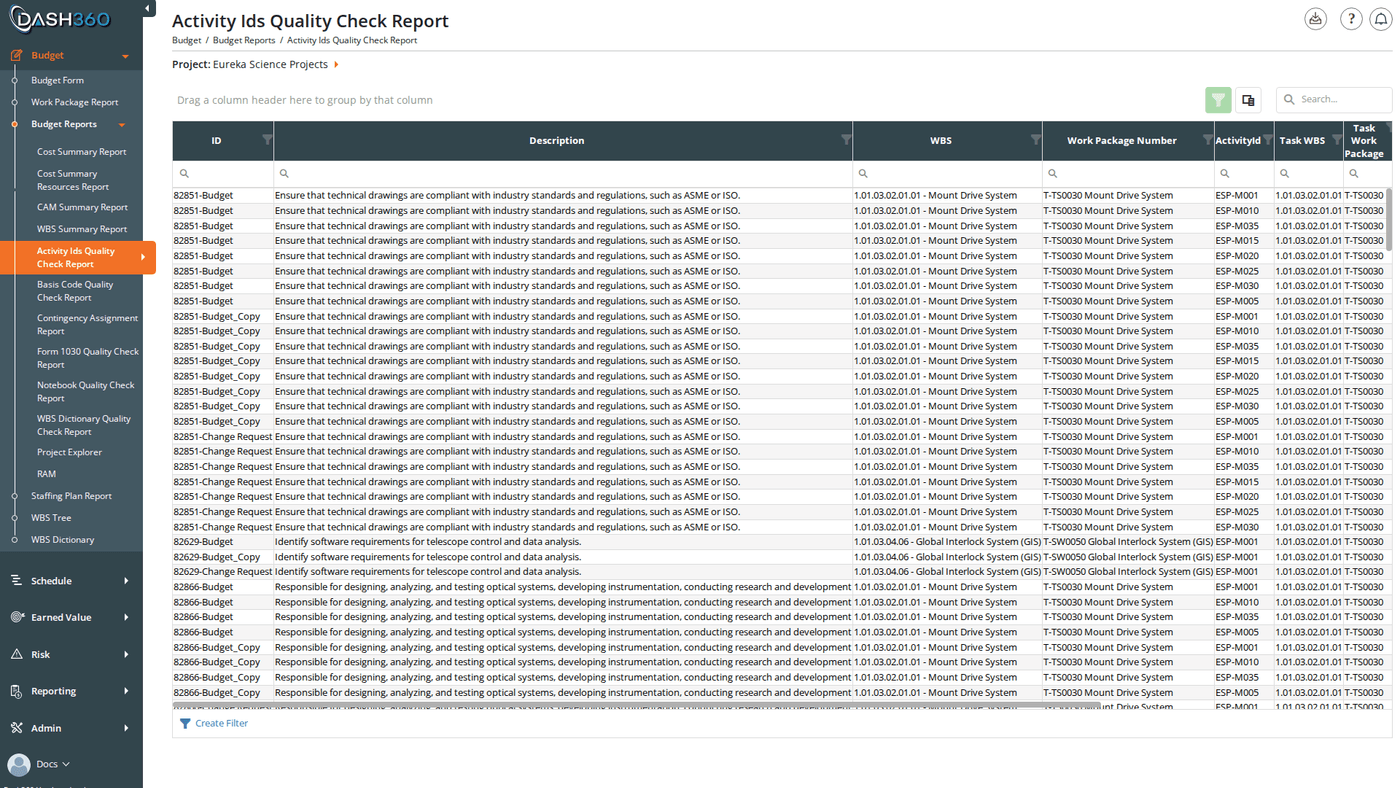
Lists every resource assignment in the project along with any activity IDs assigned to it, and validates whether those activity IDs exist in the project's current task list. Use this report before a schedule-cost integration review to confirm that all RA-to-activity links are valid and no stale or missing IDs remain.
### Filters
| Filter | Description |
| ----------------- | ------------------------------------------------------------------------------------------------------------------- |
| **Project** | Required |
| **WBS** | Limit to a specific WBS branch |
| **Cost Class** | Budget, Actual, Forecast, or a configured cost set |
| **Display Units** | \$, \$K, or \$M |
| **Calendar** | Selects which custom calendar to use for time-phased breakdowns (shown only when the project uses custom calendars) |
***
## Activity IDs Quality Check Report
Lists every resource assignment in the project along with any activity IDs assigned to it, and validates whether those activity IDs exist in the project's current task list. Use this report before a schedule-cost integration review to confirm that all RA-to-activity links are valid and no stale or missing IDs remain.
 ### Filters
| Filter | Description |
| ----------------- | ---------------------------------- |
| **Project** | Required |
| **Section Views** | Apply a saved column configuration |
### Columns
| Column | Description |
| ------------------------- | ------------------------------------------------------------------------------------------------------------------------------ |
| **WBS Level 1 … Level N** | WBS hierarchy columns (grouped) |
| **Work Package** | Work package containing the resource assignment |
| **Cost Class** | The cost class of this resource assignment |
| **Resource Type** | Labor, Non-Labor, or Travel |
| **Resource Code** | The resource assigned |
| **Activity ID** | The schedule activity ID linked to this resource assignment (blank if none) |
| **Valid** | **Yes** if the activity ID exists in the project's task list; **No** if the ID is assigned but does not match any current task |
Rows where **Valid = No** indicate broken schedule links that need to be corrected on the Budget Form or via a schedule re-import.
***
## Basis Code Quality Check Report
Lists all budget resource assignments and shows whether each one has a basis code assigned. Use this report to find gaps before a basis-of-estimate review.
### Filters
| Filter | Description |
| ----------------- | ---------------------------------- |
| **Project** | Required |
| **Section Views** | Apply a saved column configuration |
### Columns
| Column | Description |
| ------------------------- | ------------------------------------------------------------------------------------------------------------------------------ |
| **WBS Level 1 … Level N** | WBS hierarchy columns (grouped) |
| **Work Package** | Work package containing the resource assignment |
| **Cost Class** | The cost class of this resource assignment |
| **Resource Type** | Labor, Non-Labor, or Travel |
| **Resource Code** | The resource assigned |
| **Activity ID** | The schedule activity ID linked to this resource assignment (blank if none) |
| **Valid** | **Yes** if the activity ID exists in the project's task list; **No** if the ID is assigned but does not match any current task |
Rows where **Valid = No** indicate broken schedule links that need to be corrected on the Budget Form or via a schedule re-import.
***
## Basis Code Quality Check Report
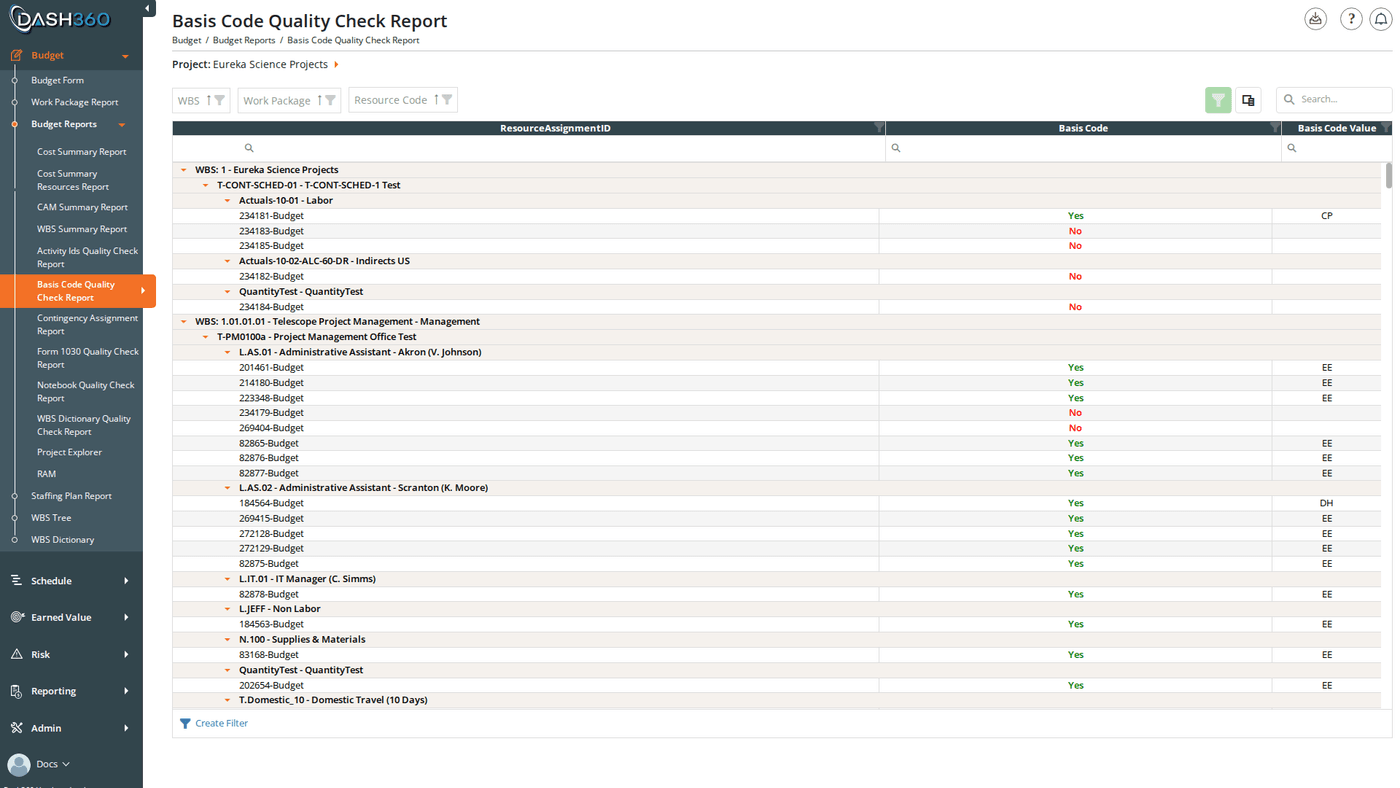
Lists all budget resource assignments and shows whether each one has a basis code assigned. Use this report to find gaps before a basis-of-estimate review.
 ### Filters
| Filter | Description |
| ----------------- | ---------------------------------- |
| **Project** | Required |
| **WBS** | Limit to a specific WBS branch |
| **Section Views** | Apply a saved column configuration |
### Columns
| Column | Description |
| ------------------------- | ------------------------------------------------------- |
| **WBS Level 1 … Level N** | WBS hierarchy columns (grouped) |
| **Work Package** | Work package containing the resource assignment |
| **Resource Type** | Labor, Non-Labor, or Travel |
| **Resource Code** | The resource assigned |
| **Has Basis Code** | **Yes** if a basis code is assigned; **No** if missing |
| **Basis Code** | The assigned basis code value (blank when not assigned) |
***
## Contingency Assignment Report
Shows all contingency assignments in the project. Use this to audit contingency coverage and identify work packages or resource assignments where contingency has not been assigned.
### Filters
| Filter | Description |
| ----------------- | ---------------------------------- |
| **Project** | Required |
| **WBS** | Limit to a specific WBS branch |
| **Section Views** | Apply a saved column configuration |
### Columns
| Column | Description |
| ------------------------- | ------------------------------------------------------- |
| **WBS Level 1 … Level N** | WBS hierarchy columns (grouped) |
| **Work Package** | Work package containing the resource assignment |
| **Resource Type** | Labor, Non-Labor, or Travel |
| **Resource Code** | The resource assigned |
| **Has Basis Code** | **Yes** if a basis code is assigned; **No** if missing |
| **Basis Code** | The assigned basis code value (blank when not assigned) |
***
## Contingency Assignment Report
Shows all contingency assignments in the project. Use this to audit contingency coverage and identify work packages or resource assignments where contingency has not been assigned.
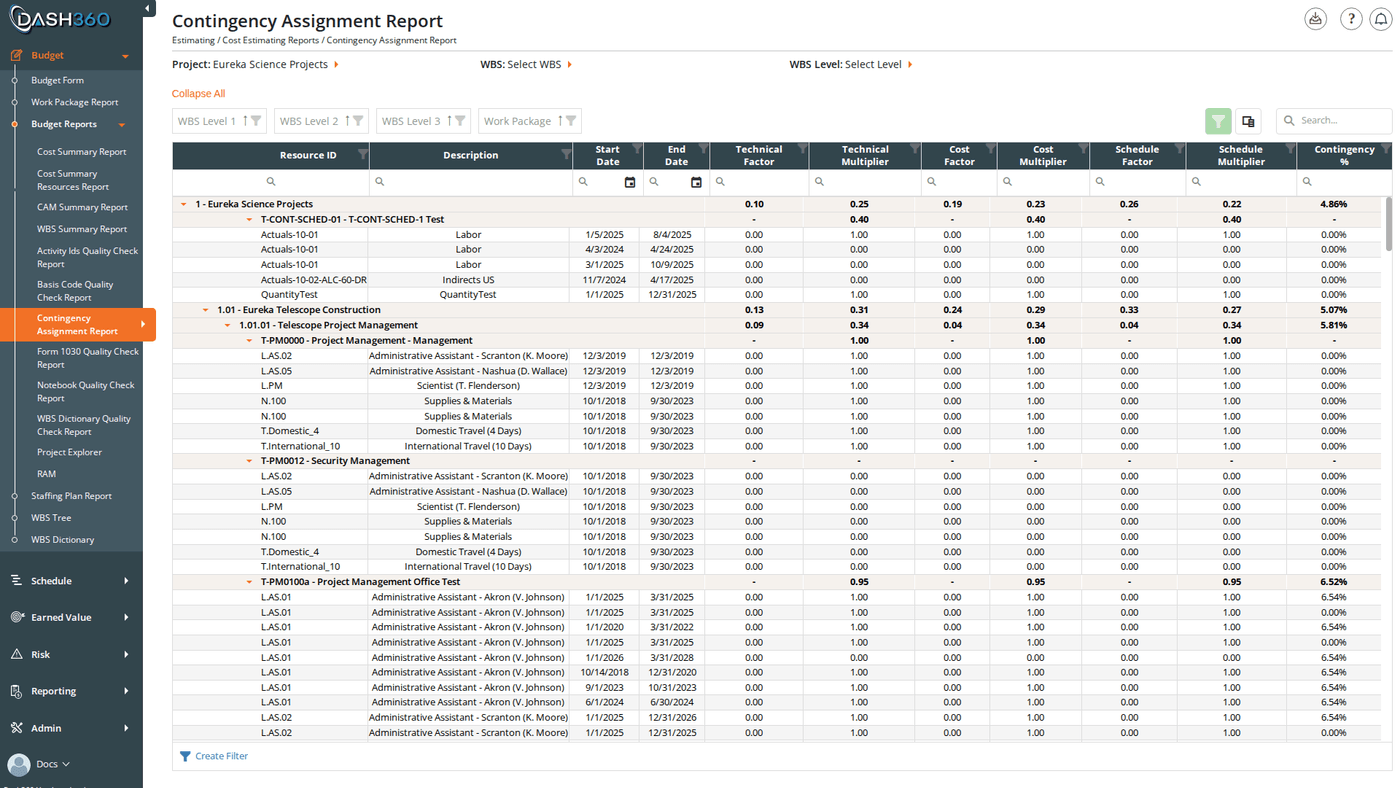 The level at which contingency appears (resource assignment or work package) depends on how the project's **Contingency Mode** is configured in the Registry. Some projects track contingency at the RA level; others at the work package level. See [Contingency Methodology](/user-guide/concepts/contingency-methodology) for details.
### Filters
| Filter | Description |
| ----------------- | -------------------------------------------------- |
| **Project** | Required |
| **WBS** | Limit to a specific WBS branch |
| **Cost Class** | Budget, Actual, Forecast, or a configured cost set |
| **Section Views** | Apply a saved column configuration |
***
## Form 1030 Quality Check Report
Validates that every resource code in the project is mapped to a Form 1030 resource result category. For each resource code, the report shows whether a mapping exists and what category it maps to. Use this report before generating a Form 1030 report to confirm that all codes are properly configured.
The level at which contingency appears (resource assignment or work package) depends on how the project's **Contingency Mode** is configured in the Registry. Some projects track contingency at the RA level; others at the work package level. See [Contingency Methodology](/user-guide/concepts/contingency-methodology) for details.
### Filters
| Filter | Description |
| ----------------- | -------------------------------------------------- |
| **Project** | Required |
| **WBS** | Limit to a specific WBS branch |
| **Cost Class** | Budget, Actual, Forecast, or a configured cost set |
| **Section Views** | Apply a saved column configuration |
***
## Form 1030 Quality Check Report
Validates that every resource code in the project is mapped to a Form 1030 resource result category. For each resource code, the report shows whether a mapping exists and what category it maps to. Use this report before generating a Form 1030 report to confirm that all codes are properly configured.
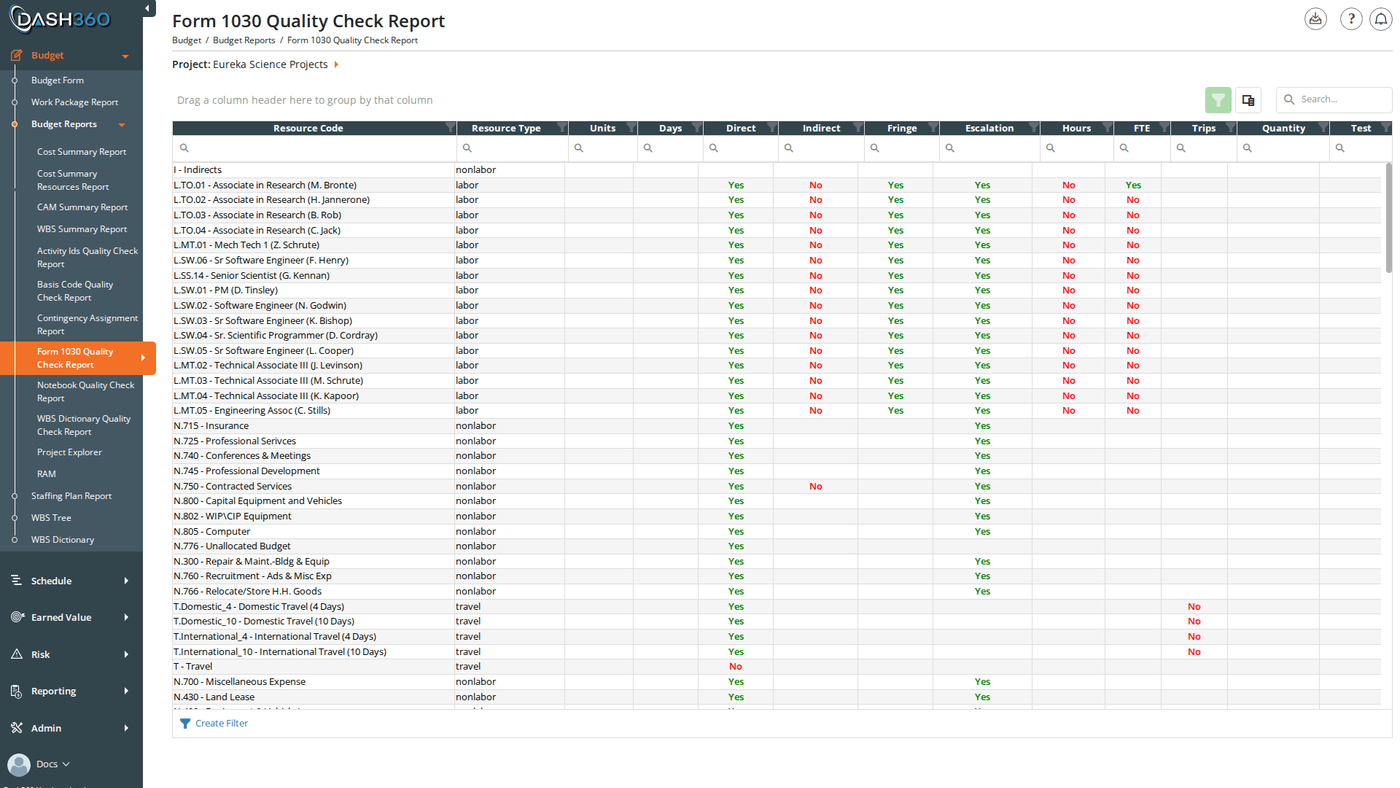 This report requires the project's resource file to have a Form 1030 file assigned. If no Form 1030 file is configured, the report will not return results.
### Filters
| Filter | Description |
| ----------------- | ---------------------------------- |
| **Project** | Required |
| **Section Views** | Apply a saved column configuration |
***
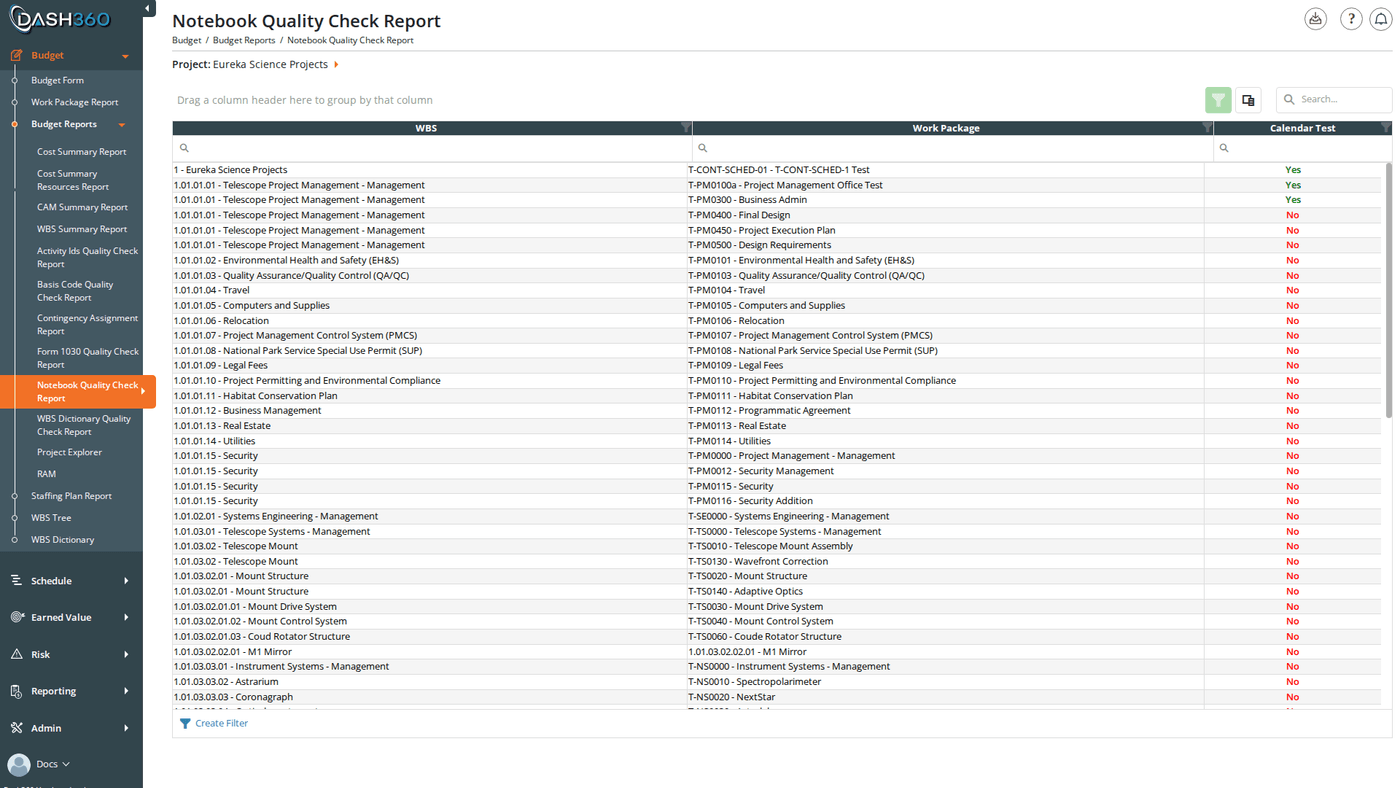
## Notebook Quality Check Report
Lists all work packages in the project and shows whether each configured notebook field is populated. Each notebook category configured for the project gets its own column. Use this report to find work packages with missing or incomplete notebook entries before a review or deliverable.
This report requires the project's resource file to have a Form 1030 file assigned. If no Form 1030 file is configured, the report will not return results.
### Filters
| Filter | Description |
| ----------------- | ---------------------------------- |
| **Project** | Required |
| **Section Views** | Apply a saved column configuration |
***
## Notebook Quality Check Report
Lists all work packages in the project and shows whether each configured notebook field is populated. Each notebook category configured for the project gets its own column. Use this report to find work packages with missing or incomplete notebook entries before a review or deliverable.
 ### Filters
| Filter | Description |
| ----------------- | ---------------------------------- |
| **Project** | Required |
| **WBS** | Limit to a specific WBS branch |
| **Section Views** | Apply a saved column configuration |
### Columns
| Column | Description |
| ----------------------------- | ------------------------------------------------------------------------------------------------------------------------------------------ |
| **WBS Level 1 … Level N** | WBS hierarchy columns (grouped) |
| **Work Package** | The work package being checked |
| **\[Notebook Category Name]** | One column per configured notebook category. Each shows **Yes** if that category has a value for this work package, **No** if it is empty. |
***
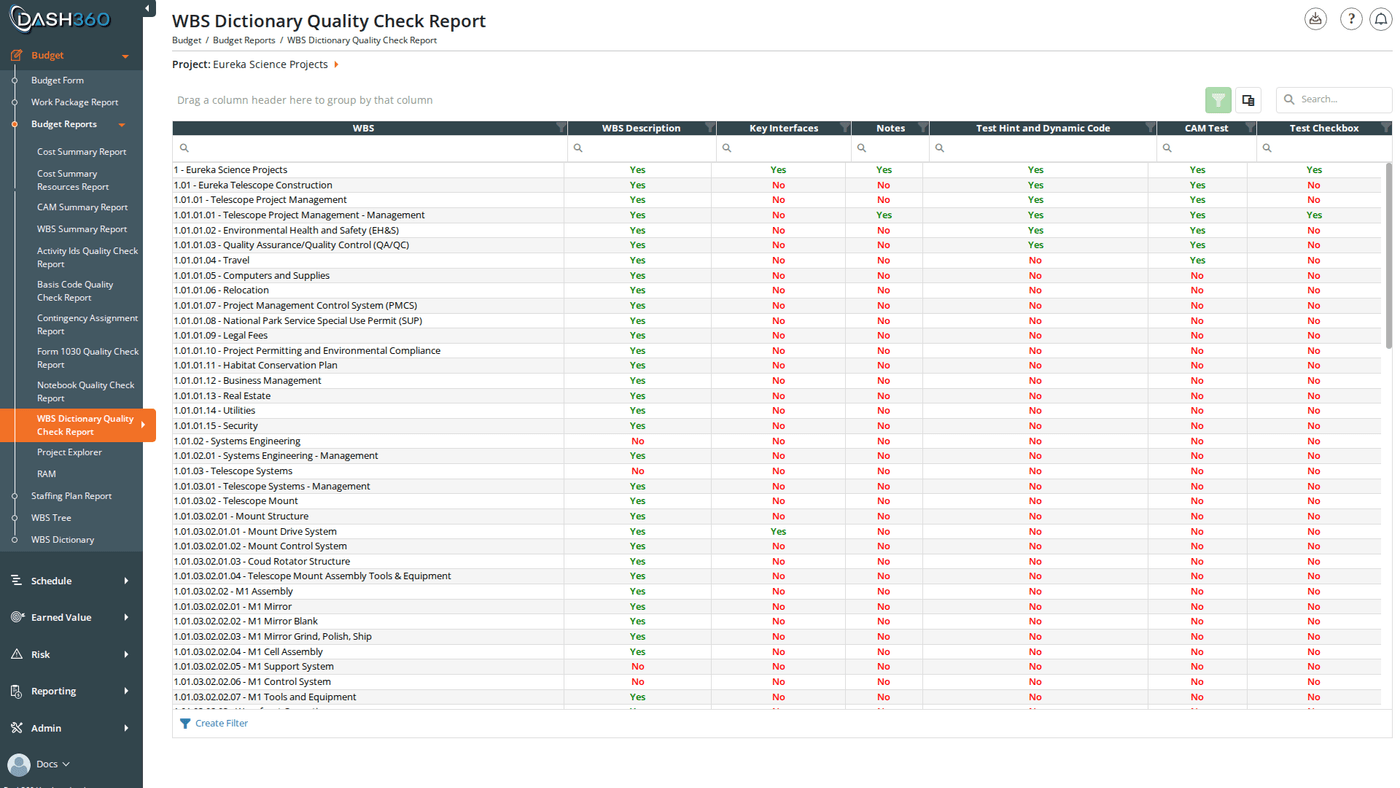
## WBS Dictionary Quality Check Report
Similar to the Notebook Quality Check Report but for WBS-level notebook entries (the WBS Dictionary). Lists all WBS codes and shows whether each notebook category is populated at the WBS level rather than the work package level.
### Filters
| Filter | Description |
| ----------------- | ---------------------------------- |
| **Project** | Required |
| **WBS** | Limit to a specific WBS branch |
| **Section Views** | Apply a saved column configuration |
### Columns
| Column | Description |
| ----------------------------- | ------------------------------------------------------------------------------------------------------------------------------------------ |
| **WBS Level 1 … Level N** | WBS hierarchy columns (grouped) |
| **Work Package** | The work package being checked |
| **\[Notebook Category Name]** | One column per configured notebook category. Each shows **Yes** if that category has a value for this work package, **No** if it is empty. |
***
## WBS Dictionary Quality Check Report
Similar to the Notebook Quality Check Report but for WBS-level notebook entries (the WBS Dictionary). Lists all WBS codes and shows whether each notebook category is populated at the WBS level rather than the work package level.
 ### Filters
| Filter | Description |
| ----------------- | ---------------------------------- |
| **Project** | Required |
| **Section Views** | Apply a saved column configuration |
### Columns
| Column | Description |
| ----------------------------- | ----------------------------------------------------------------------------- |
| **WBS Level 1 … Level N** | WBS hierarchy (grouped) |
| **WBS Code** | The WBS element code |
| **\[Notebook Category Name]** | One column per configured WBS dictionary category. **Yes** / **No** for each. |
***
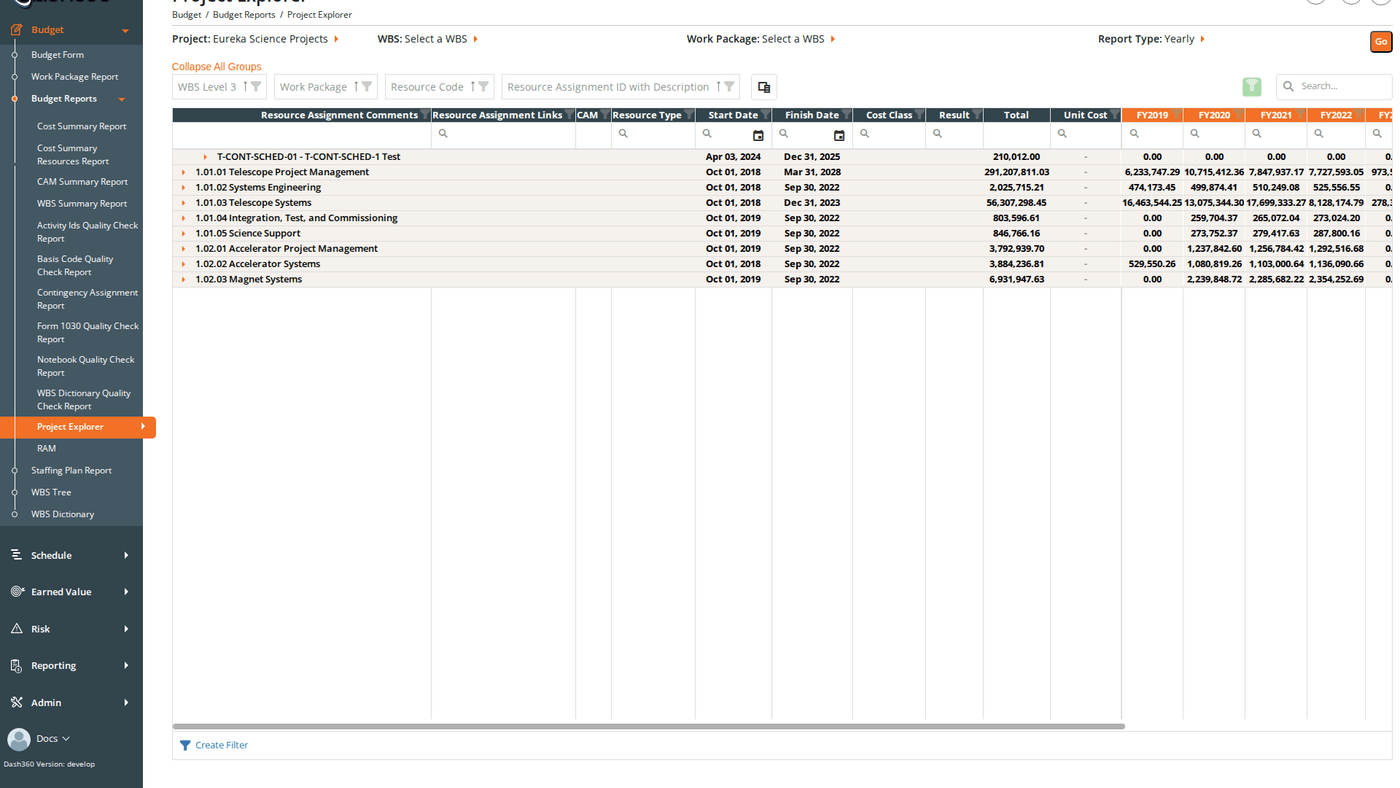
## Project Explorer
A time-phased cost grid showing estimated costs by WBS and work package. Select a project, optionally filter to a WBS branch or work package, then choose **Yearly** or **Monthly** to view costs broken out by fiscal year or calendar month. Use the Project Explorer to drill into the estimate at any level of the hierarchy and compare time-phased spend across the project.
### Filters
| Filter | Description |
| ----------------- | ---------------------------------- |
| **Project** | Required |
| **Section Views** | Apply a saved column configuration |
### Columns
| Column | Description |
| ----------------------------- | ----------------------------------------------------------------------------- |
| **WBS Level 1 … Level N** | WBS hierarchy (grouped) |
| **WBS Code** | The WBS element code |
| **\[Notebook Category Name]** | One column per configured WBS dictionary category. **Yes** / **No** for each. |
***
## Project Explorer
A time-phased cost grid showing estimated costs by WBS and work package. Select a project, optionally filter to a WBS branch or work package, then choose **Yearly** or **Monthly** to view costs broken out by fiscal year or calendar month. Use the Project Explorer to drill into the estimate at any level of the hierarchy and compare time-phased spend across the project.
 ### Filters
| Filter | Description |
| ---------------- | -------------------------------------------------------------------------- |
| **Project** | Required |
| **WBS** | Limit the view to a specific WBS branch |
| **Work Package** | Further filter to a single work package within the selected WBS |
| **Report Type** | **Yearly**: one column per fiscal year. **Monthly**: one column per month. |
***
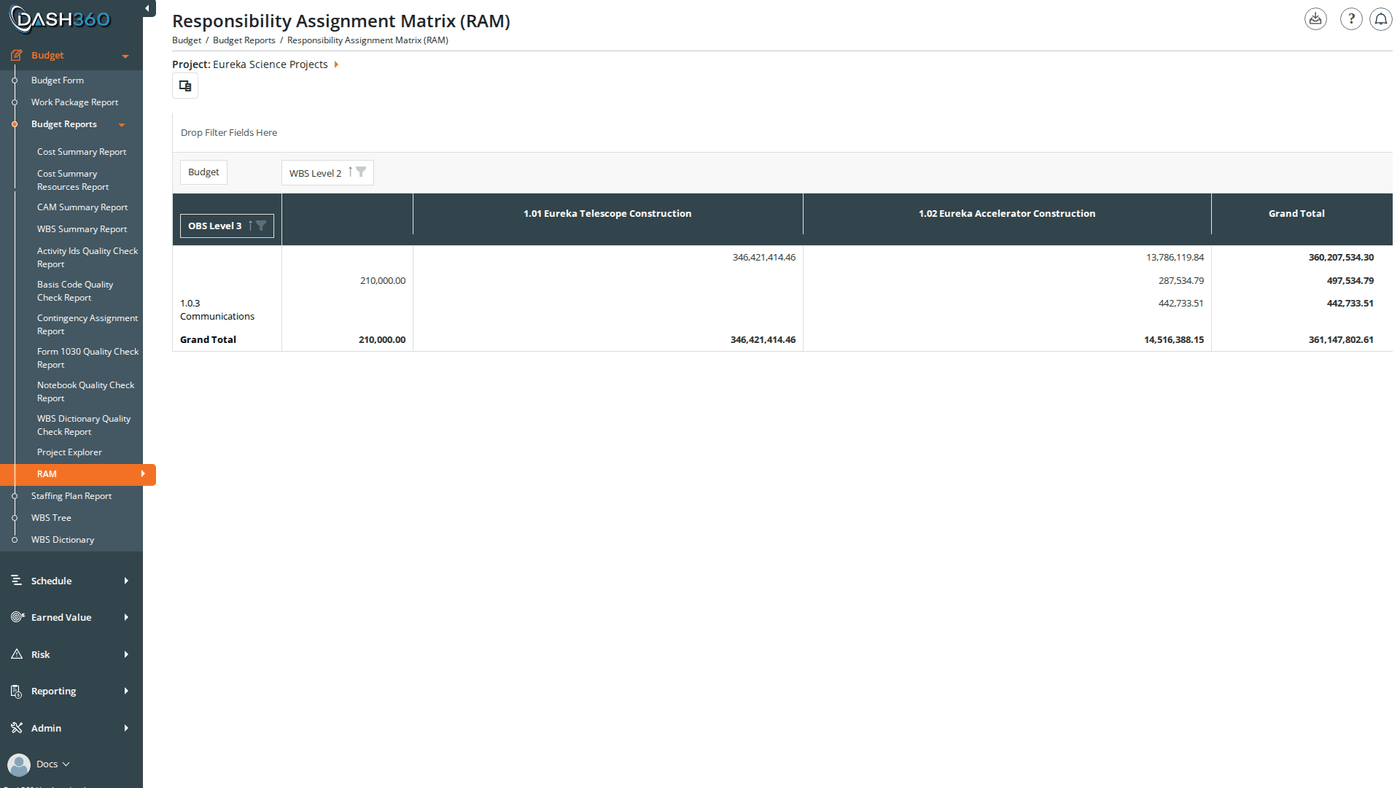
## Responsibility Assignment Matrix (RAM)
An interactive pivot grid cross-referencing WBS levels, cost classes, and resource assignments. Use the RAM to pivot the estimate by any combination of dimensions (drag fields into rows, columns, or filters) and inspect rolled-up costs at any intersection. Supports export to Excel.
### Filters
| Filter | Description |
| ---------------- | -------------------------------------------------------------------------- |
| **Project** | Required |
| **WBS** | Limit the view to a specific WBS branch |
| **Work Package** | Further filter to a single work package within the selected WBS |
| **Report Type** | **Yearly**: one column per fiscal year. **Monthly**: one column per month. |
***
## Responsibility Assignment Matrix (RAM)
An interactive pivot grid cross-referencing WBS levels, cost classes, and resource assignments. Use the RAM to pivot the estimate by any combination of dimensions (drag fields into rows, columns, or filters) and inspect rolled-up costs at any intersection. Supports export to Excel.
 ### Filters
| Filter | Description |
| ----------- | -------------------------------------------------------------------------- |
| **Project** | Required. Loads all resource assignments and cost data for the pivot grid. |
### Filters
| Filter | Description |
| ----------- | -------------------------------------------------------------------------- |
| **Project** | Required. Loads all resource assignments and cost data for the pivot grid. |