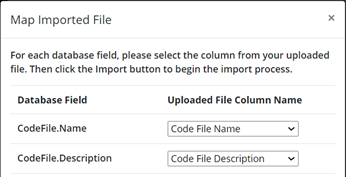
1. Go to Admin - Import / Export2. Select Codes from the Data to Import dropdown3. Download the Codes Data Template from the Dash360 Import/Export tab4. Copy and Paste your data into the Codes Data Templatea) Code File Name Name of Code Fileb) Code File Description Description of Code Filec) Code File Name Link Used when updating data in the Dash360 system. Can leave blank.d) Code File Description Link Used when updating data in the Dash360 system. Can leave blank.e) Link Order Used when updating data in the Dash360 system. Can leave blank.f) Code Name OBS Codeg) Code Description5. Save your file6. Choose your file from the Import tab7. Ensure columns were mapped correctly (Database Field matches Column Name)8. Import!