

Overview
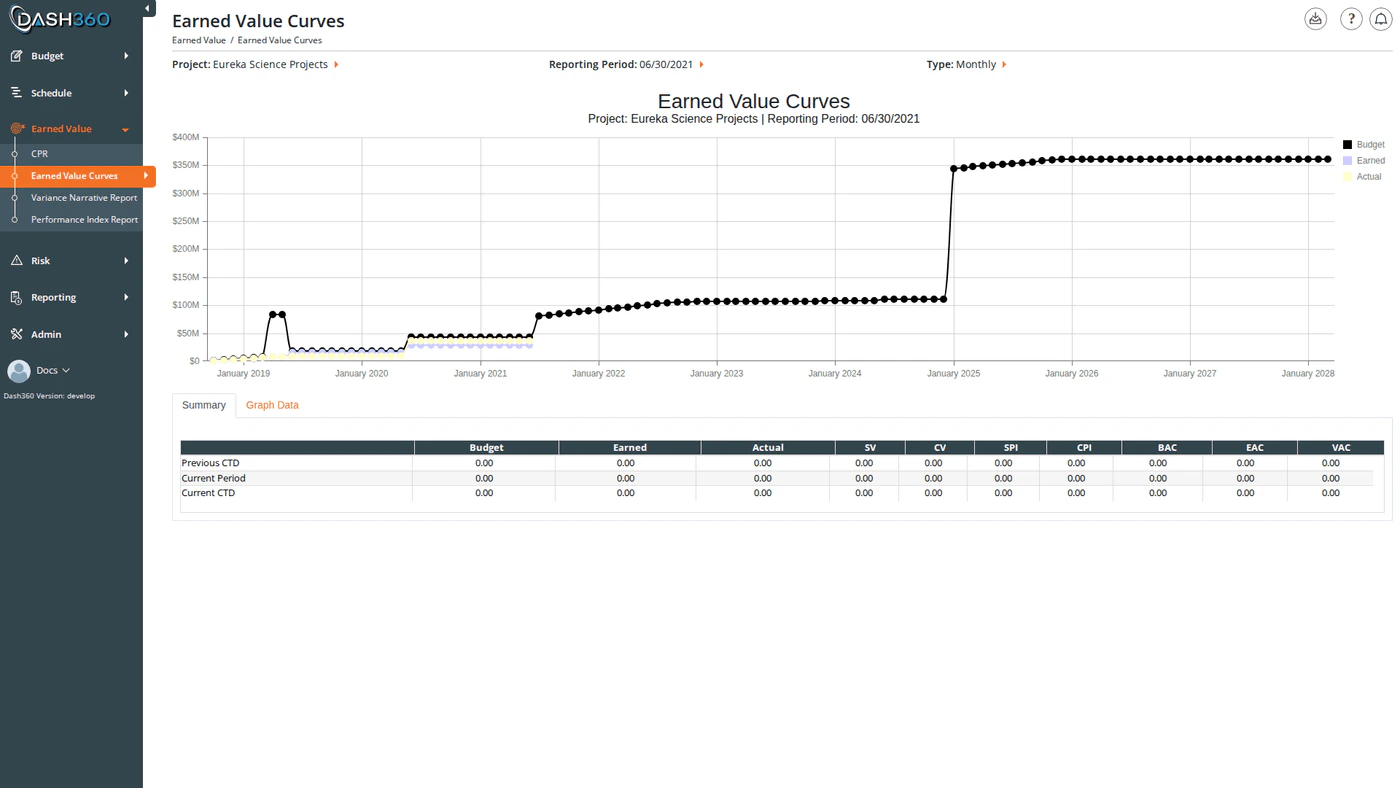
The Earned Value Curves report plots three core EVM metrics over your project timeline as S-curves; Budget (BCWS), Earned Value (BCWP), and Actual Cost (ACWP). The shape and relative position of these curves tells you at a glance whether you are ahead of or behind schedule and whether you are over or under budget. Below the chart, two tabs provide tabular views of the data: a Summary grid with key performance metrics and a Graph Data grid with the raw time-series values behind the chart. URL:/EarnedValue/EarnedValueCurves/Index
Prerequisites
- Select a project and reporting period. The chart and data grids do not load until both are selected.
Reading the Chart
The chart plots three spline curves over your project timeline:
Reading the gap between curves:
- If the Earned curve is below the Budget curve, the project is behind schedule (negative Schedule Variance).
- If the Actual curve is above the Earned curve, the project is over budget (negative Cost Variance).
- Click any legend item to show or hide that curve.
- Hover over a data point to see the exact value for that period.
- Zoom by clicking and dragging on the chart to focus on a specific date or value range.
- Pan by holding and dragging after zooming to scroll along the axis.
Summary Tab
The Summary tab (active by default) shows a metrics grid with three rows:
Each row shows the following columns:
Graph Data Tab
The Graph Data tab shows the raw time-series data behind the chart; one row per period from project start through the selected reporting period.
This tab is useful for verifying data or copying period-level values for external analysis.
Available Filters
The Project and Reporting Period selectors appear in the page header. All other filters are in the left-side filter panel, which activates after a reporting period is selected.
Currency Format options:
When to Use This Report
Use EV Curves at the start of any status review to establish the overall performance picture before diving into CPR detail. The S-curve immediately reveals whether performance is improving or degrading over time; something a tabular report alone cannot show. Use the Axis toggle to switch between monthly granularity (useful for recent periods) and yearly (useful for long-range projects to see the full arc of performance). Use the WBS and Work Package filters to narrow the curves to a specific area of the project when investigating a localized cost or schedule issue.Exporting
Click the Download icon and select Export to Excel to downloadEVCurves.xlsx. The workbook contains three sheets:
Export to PDF
Click the Download icon and select Export to PDF to downloadEVCurves.pdf. It contains
the S-curve chart, the Summary grid and the Graph Data grid, in that order.
The Currency Format selection is carried through: a chart shown in millions exports in
millions, with the column headings saying so and the cover page recording the denomination.
The PDF is rendered on the server by the same engine that produces the Site Shutdown Report, so a report exported from this screen and the same report inside that document are one implementation rather than two that drift apart.
The export respects the filters currently applied to the screen. A PDF taken from a filtered screen covers what is on the screen, not the whole project.