

Overview
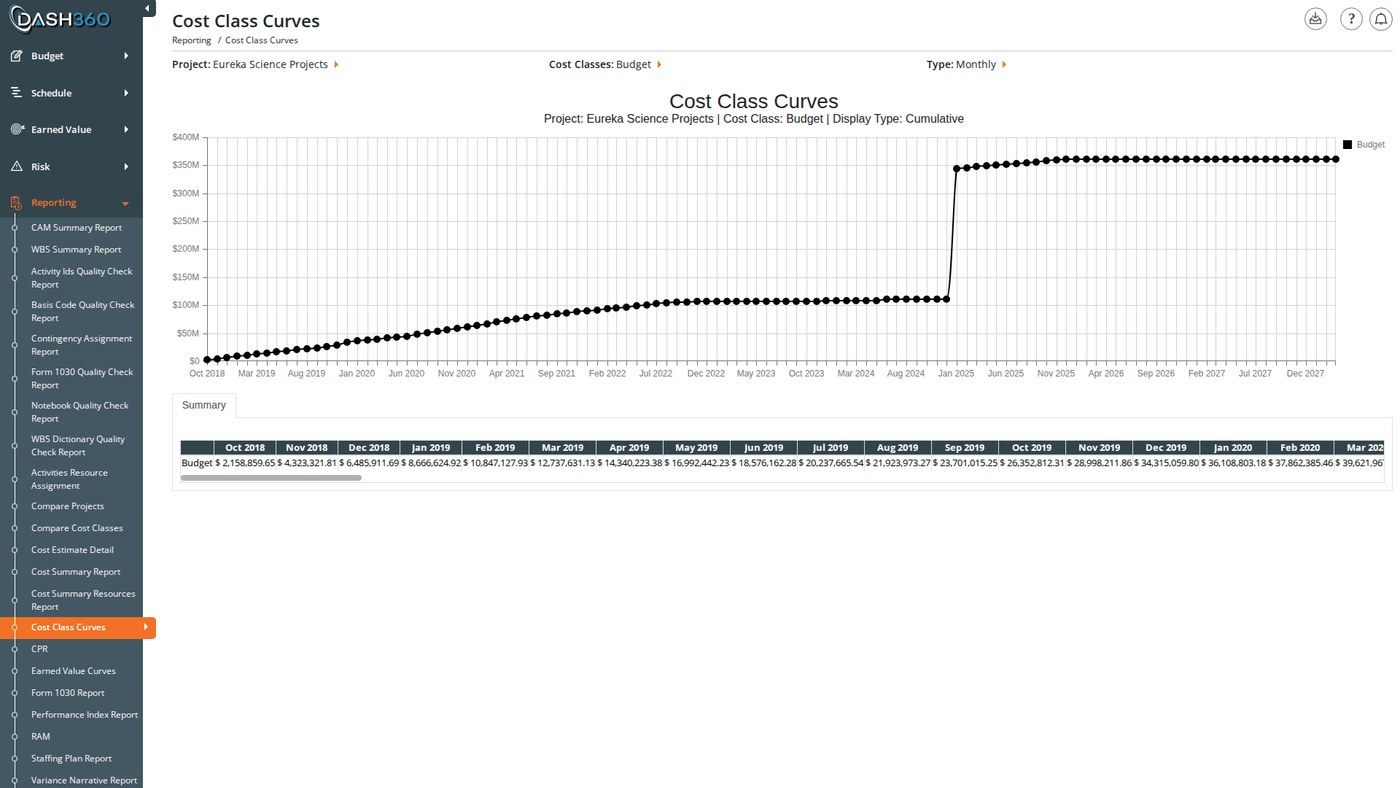
Cost Class Curves plots your selected cost classes as spline curves on a single chart, letting you compare how Budget, Actual, EAC, and any other configured cost classes accumulate across the project timeline. This makes it easy to spot when actuals begin to diverge from budget, or to compare a current estimate against previous baselines. A data grid below the chart shows the exact values for each period alongside the chart. URL:/Reporting/CostClassCurvesReport/Index
Prerequisites
- Select a project and at least one cost class. The chart does not render until both are selected.
Filters
Additional Filters
The following filter sections appear when the selected project has applicable data configured. They are hidden if no relevant codes are set up for the project.Custom Calendar Projects
For projects configured with a custom calendar:- The Axis dropdown is replaced by a Calendar dropdown listing the project’s named calendars
- The Cumulative / Period toggle is hidden
- The Date Range fields are hidden
- Data grid column headers use the calendar’s period labels
Filter Cascades
- Selecting a Project fetches that project’s cost classes and populates the cost class checkboxes. If the project has no cost classes configured, an error message appears.
- Selecting a WBS populates the Work Package filter. If no WBS is selected, the Work Package dropdown shows “Select a WBS…” and cannot be used.
Reading the Chart
Each selected cost class appears as a separate spline curve. Colors are assigned per cost class by your administrator. The legend is positioned in the upper right of the chart. Toggle between two views using the Cumulative / Period selector:
Switch between Monthly and the yearly option (Calendar Year or Fiscal Year, depending on the project’s year setting) on the Type selector to adjust the time granularity on the horizontal axis. On a fiscal-year project, yearly points are labeled with an
FY prefix (for example, FY2026).
Hover over any data point to see the exact value for that period.
Use the chart legend to show or hide individual cost class curves by clicking a series name.
Summary Data Grid
Below the chart, the data grid shows the cost values behind each curve broken out by period.- In Monthly mode, column headers use
Dec 2024format - In yearly mode, column headers show the year:
FY2026on a fiscal-year project, or the plain year (2026) on a calendar-year project - For custom calendar projects, column headers use the calendar’s period labels
- In Period view, a Total column is added showing the sum across all displayed periods
- In Cumulative view, there is no Total column (the final period value represents the total)
When to Use This Report
Use Cost Class Curves when you need to:- Track budget vs. actuals over time: overlay Budget and Actual curves to see when and how fast spending is diverging from plan.
- Compare estimate revisions: plot original budget alongside a revised estimate to visualize scope changes across the timeline.
- Identify cost acceleration: switch to Period view to spot months or fiscal years with unusually high or low activity.
- Scope down to a work area: use the WBS and Work Package filters to isolate a specific part of the project for targeted analysis.
- Benchmark against EAC: add an Estimate at Completion curve alongside Budget and Actual to assess overall project health in one view.
Saved Views
Cost Class Curves supports named saved views that preserve your filter selections and column layout. Use the view selector in the toolbar to save and reload your own named views.When viewing a system view, the message “Currently viewing a system view. Changes will not be saved.” appears at the top right of the grid.
Exporting
Click the Download icon and select Export as Excel. The file is saved asCCCurves.xlsx with two sheets: