

Overview
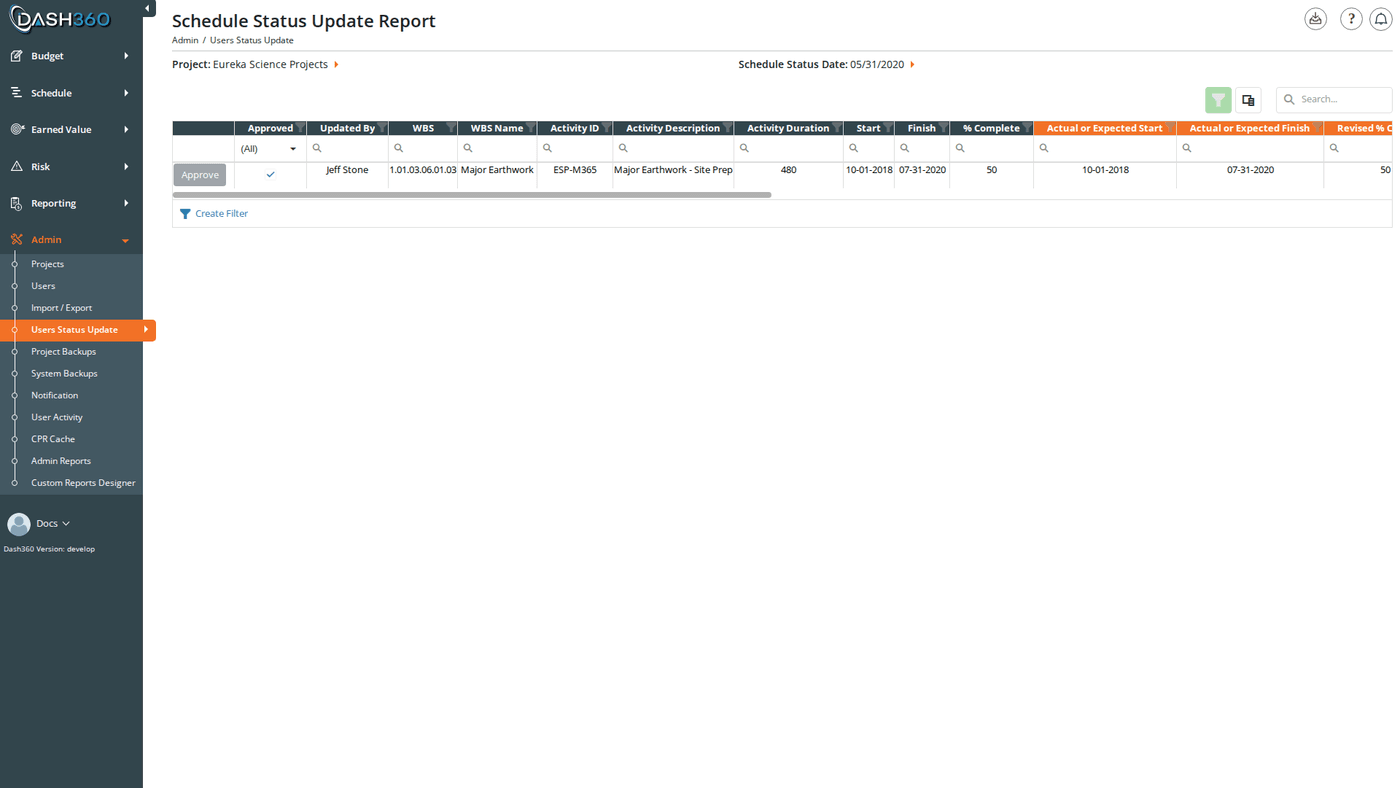
The User Status Update page is where administrators review and approve the schedule activity updates that CAMs submit from the Quick Status page. Each row in the grid is a single activity update; showing both the current schedule values and the CAM’s proposed changes side by side. Administrators can approve or delete each update individually, or approve all visible updates at once. Only approved updates are written back to the project schedule and become available for earned value calculations.Permissions
Administrator role required.How the Workflow Works
- A CAM navigates to Quick Status and submits activity progress updates for a reporting period.
- Each activity update appears as a separate row on this page, pending administrator review.
- An administrator selects the project and schedule status date, reviews each activity update, and either:
- Approves the update: writes the CAM’s values into the project schedule
- Deletes the update: discards it; the schedule is not changed and the CAM may need to resubmit
Filters
Two filters control which activity updates are displayed. Both must be set before the grid loads.
Below the filters is a Hide unchanged activities checkbox. When a CAM submits Quick Status for every activity, many rows come through with no real change (the same start and finish dates, the same percent complete, no comment, and no dependency changes). Turn this on to hide those unchanged rows so the grid shows only the activities the CAM actually changed. It is off by default, so the grid shows every submitted update unless you enable it. Toggling it reloads the grid for the selected project and status date.
An activity update counts as “unchanged” only when its Actual or Expected Start, Actual or Expected Finish, and Revised % Complete all match the activity’s current schedule values, it has no comment, no added or removed predecessors or successors, and it is not a delete request. Anything the CAM actually changed keeps the row visible.
If you navigate to this page with a
?projectId= parameter in the URL, the project is pre-selected automatically and the schedule status dates load immediately.Activity Updates Grid
The grid shows one row per activity update. It has a search panel, filter row, and header filters. Export to Excel is also available. The columns are grouped into two sets. Non-highlighted columns show the activity’s current values in the schedule (what it looks like before the CAM’s update is applied). Orange-highlighted columns show the values the CAM submitted; these are what will be written to the schedule if the update is approved.Current Schedule Values (non-highlighted)
CAM-Submitted Values (orange header)
Dependency Changes
Timestamps
Approving an Activity Update
Click the Approve button on any row. The button is disabled if the row is already approved. When an activity update is approved, the following changes are written to the project schedule immediately:- Start Date is updated to the CAM’s Actual or Expected Start
- Finish Date is updated to the CAM’s Actual or Expected Finish
- % Complete is updated to the CAM’s Revised % Complete
- Activity Description is updated to the CAM’s submitted description
- Duration is updated to the CAM’s submitted duration
- Added predecessors are created as new task dependency links
- Added successors are created as new task dependency links
- Removed predecessors have their dependency links deleted
- Removed successors have their dependency links deleted
- Activity step updates (if any) are processed: steps are added, updated, or deleted to match the CAM’s submitted step data