

Overview
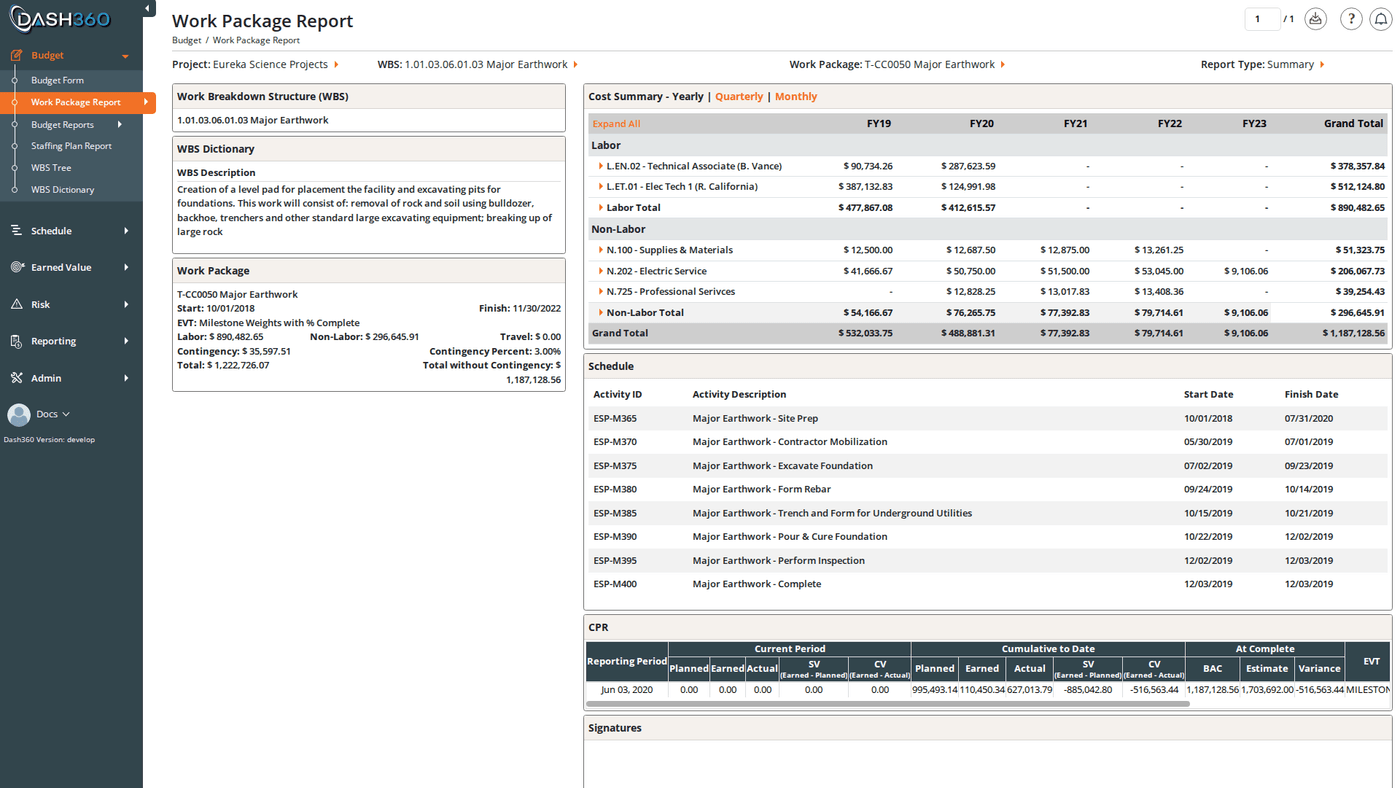
The Work Package Report gives you a complete, consolidated view of each work package: its WBS context, cost summary, time-phased data, resource assignments, schedule tasks, and more; all on one screen. Page through work packages one at a time using the navigation controls, or jump directly to a specific work package using the Work Package filter. URL:/Estimating/WorkPackageReport/Index
Prerequisites
- A project, WBS, and work package must be selected before the report loads.
Filters
Navigating Work Packages
Use the First, Previous, page number input, Next, and Last controls in the header to move through work packages in order. A counter shows your current position (e.g., “Work Package 3 of 47”). Type a page number directly into the page input and press Enter to jump to a specific work package.When Show WPs with No Costs is off, the paginator counts only work packages that have resource assignments. Turn it on to navigate through all work packages including empty ones.
Left Panel
The left panel contains several cards showing context and summary data for the selected work package. Which cards appear depends on your project’s registry configuration.Work Breakdown Structure (WBS)
Shows the WBS code and description for the selected work package’s location in the hierarchy. This card is hidden when theWork-Package-Report-Show-WBS registry setting is off.
WBS Dictionary
Shows the notebook fields configured for this WBS element. This card is hidden whenWork-Package-Report-Show-WBS-Dictionary is off.
Work Package
The Work Package card displays the key metadata and cost summary for the selected work package:
The Contingency row is hidden when
Work-Package-Report-Show-Contingency is off.
This card is hidden when Work-Package-Report-Show-Work-Package is off.
Notebooks
Shows the notebook fields configured for the work package itself (as distinct from WBS dictionary fields). This card is hidden whenWork-Package-Report-Show-Notebooks is off.
Right Panel
Cost Summary
The Cost Summary section shows time-phased cost data across the project timeline. Switch between time scales using the tabs:
This section is hidden when
Work-Package-Report-Show-Cost-Summary is off.
Tasks
Lists the schedule tasks linked to this work package. This section is hidden whenWork-Package-Report-Show-Schedule is off.
CPR
When enabled, an embedded CPR (Cost Performance Report) data grid appears showing earned value metrics for this work package; budget, earned value, actual cost, schedule variance, cost variance, and performance indices. This section is hidden whenWork-Package-Report-Show-CPR is off.
Contingency
A breakdown of the contingency reserve for this work package. Hidden whenWork-Package-Report-Show-Contingency is off.
Attachments
File links associated with the resource assignments on this work package, plus any external links. Hidden whenWork-Package-Report-Show-Attachments is off.
Signatures
When signature steps are configured for the project, this block shows a signoff panel with one box per configured step (up to 3 per row). Each box shows either a signature image or the signer’s name and the date signed. This section is hidden whenWork-Package-Report-Show-Signatures is off.
Report Type
The Report Type filter controls how resource assignment data is displayed.
Use Summary for stakeholder reviews; use Detailed when you need to verify individual resource assignment entries.
Exporting
Click the Download icon in the top right to access all export options.The “All Work Packages” exports iterate through every work package in the selected WBS (respecting the Show WPs with No Costs setting) and compile them into a single file. For large projects, these exports may take a moment to generate.
Saved Views
The Work Package Report supports named saved views that preserve your filter settings and column layout. Use the Saved Views selector in the toolbar to save and reload named views.- User views are saved per-user and visible only to you.
- System views are created by administrators and available to all users.