

Overview
Dash360 provides two types of backup: system backups that run automatically on a schedule and cover all projects, and project backups that you trigger manually from the Projects page. Both types are viewable from separate admin pages in the Backups area. Backups are stored as Excel (.xlsx) files in an AWS S3 bucket and can be downloaded at any time from these pages.Permissions
Administrator role required.System Backups Page
URL:/Admin/SystemBackups/Index
The System Backups page lists all backup records created by the automated backup process. System backups run on a schedule configured by your implementation team; this page is read-only and does not have a manual trigger.
System Backups Grid
The grid supports a search panel, filter row (Apply Filters button), header filters, filter panel, grouping panel, and column chooser. Paging is set to 20 rows per page, configurable up to 100.
The Download link uses the S3 URL configured in the project’s registry. If the link does not work, verify that the
S3-URL registry setting is correctly configured for the project.Project Backups Page
URL:/Admin/ProjectBackups/Index
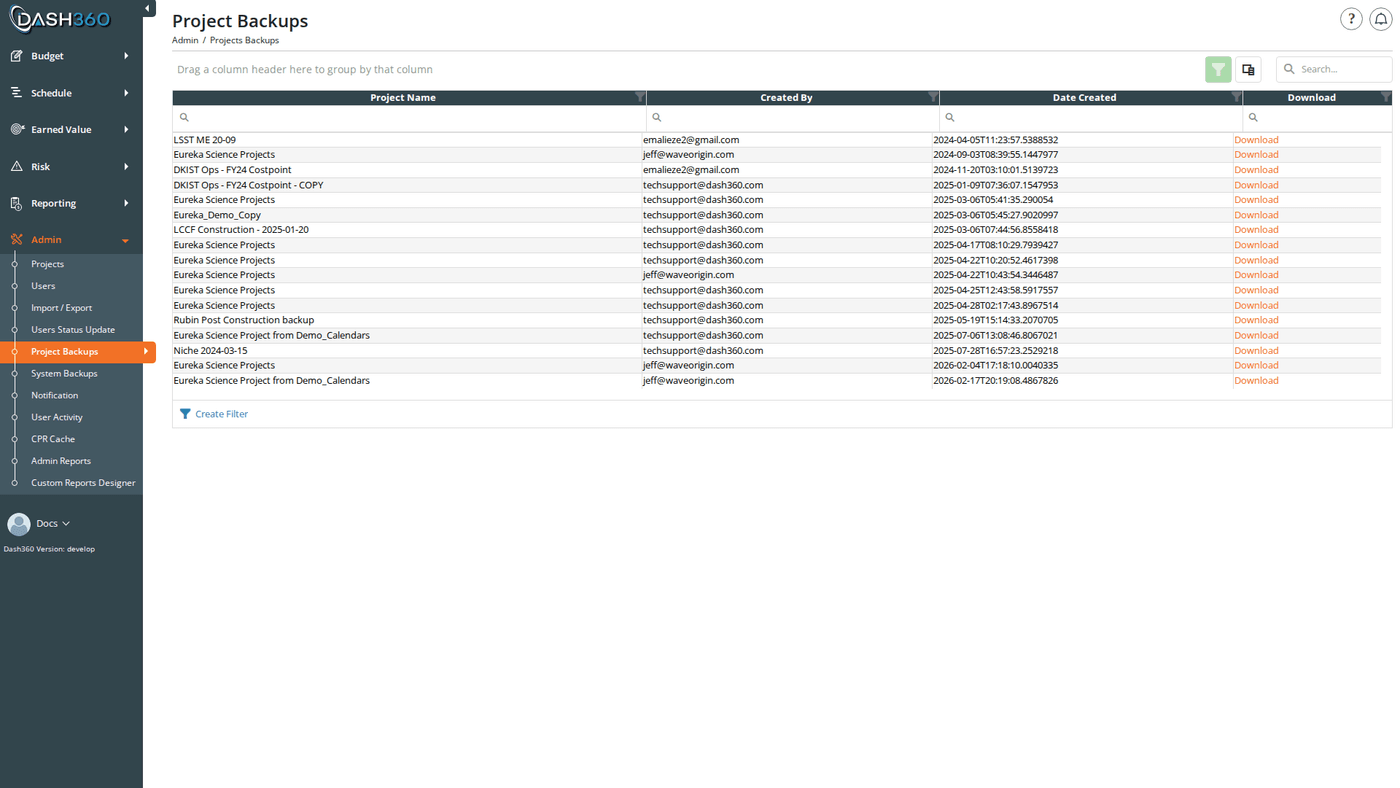
The Project Backups page lists all project backup records created by administrators from the Projects page. This page is read-only; backups are initiated from the Projects page, not here.
Project Backups Grid
The grid supports a search panel, filter row (Apply Filters button), header filters, filter panel, grouping panel, and column chooser. Paging is set to 20 rows per page, configurable up to 100.
Creating a Project Backup
Project backups are created from the Projects admin page, not from the Project Backups page. On the Projects page, each project row has an action dropdown with backup options:Backup to Another Server
The Backup Project to Another Server option opens a confirmation modal with one option:
Click Backup Project to generate and download the file.
What a Backup Contains
A project backup is a multi-sheet Excel file. The sheets included depend on which files and features are configured for the project. The backup covers:- Project configuration and settings
- Code files (Activity, Basis, WBS, Work Package, Form 1030)
- Resource codes, resource results, and resource calculations
- Rate files and rate sets
- Cost estimates and work packages
- Resource assignments and time-phased cost data
- Contingency assignments and source lines
- Schedule tasks, links, and activity steps
- Notebooks (work package, WBS, and resource assignment notebook entries)
- Variance narrative data
- Risk items, risk categories, and Monte Carlo simulations
- Signature steps and completed signature records
- CPR and earned value calculation data
- Premium pay, cost classes, and uncertainty classes
- Schedule status updates (CAM submissions)
- User permissions and resource code security assignments (unless stripped for another-server backup)
Restoring from a Backup
Restoring a project is done from the Projects admin page.- Navigate to the Projects admin page.
- Click Restore Project (below the projects list).
- In the Restore Project modal:
- Enter a Project Name for the restored project. This must be a new, unique name; the restore will fail if a project with that name already exists.
- Upload the backup .xlsx file.
- Click Restore (or submit the form). The backup is uploaded to S3, processed, and a new project is created.
- A success message confirms the project has been restored. The new project appears in the Projects list immediately.
The backup file must be a Dash360-format .xlsx backup file. Files from external tools or non-Dash360 exports are not supported.
Timestamps
All Date Created timestamps in both grids are displayed in the timezone configured via theTime-Zone registry setting (Registry Set ID 1). This ensures backup timestamps are shown in your local time regardless of when the backup was created on the server.
When to Create a Manual Backup
- Before a large data import
- Before running Shift Data on a project
- Before making significant structural changes (changing code files, removing cost classes)
- Before a major project milestone or review
- Before restoring from an older backup (to preserve the current state as a safety net)