

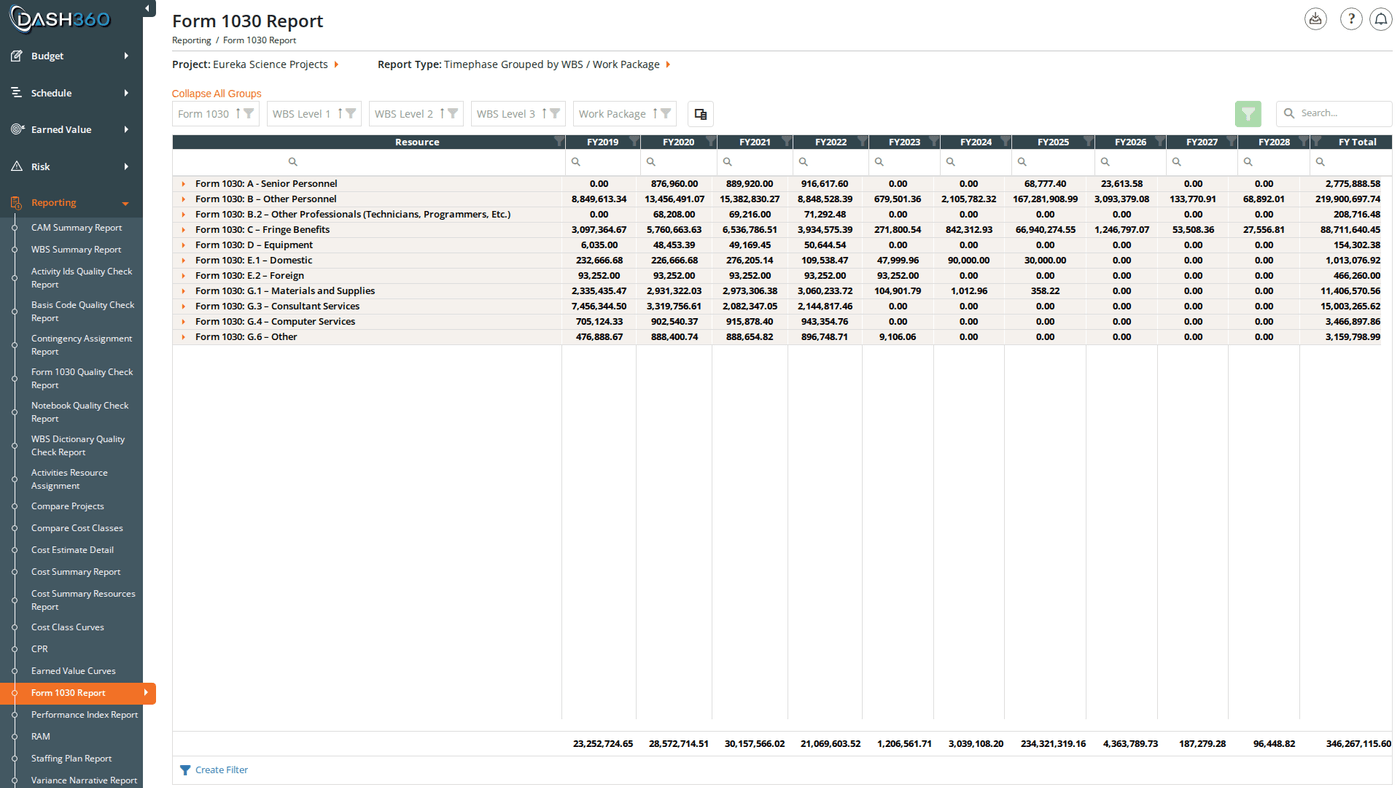
Format 1030 Report

Overview

The Format 1030 Report organizes your project’s cost data into the standardized code classification structure required by government contracting standards. Resource assignments are mapped to Form 1030 codes (government-standard cost categories) and the report displays cost data with time-phased columns and automatic subtotals at every level of the hierarchy. URL: /Reporting/Format1030Report/Index
If the selected project does not have a resource file mapped to it, an error message appears and the report cannot load. Contact your administrator to verify the project’s resource file configuration.

Prerequisites

  • Select a project. The report does not load until a project is selected.

Filters

FilterWhat It Controls
ProjectThe project to report on
Report TypeHow data is organized in the grid (see Report Types below)
Cost Class / Cost SetRadio toggle: switch between filtering by individual cost class or a configured cost set
Cost Class (or Cost Set)Which cost class(es) to include. Multi-select; you can include multiple cost classes. Default: Budget.
Currency DivisorDisplay values in base dollars, thousands (K), or millions (M)
CalendarFor projects with a custom calendar only: select which calendar’s period labels to use for time-phased columns. Hidden for standard fiscal year projects.

Report Types

Use the report type selector to choose how data is organized:
Report TypeDescription
Timephase Grouped by WBS / Work PackageCosts organized hierarchically by WBS Level 1–3 and work package, with Form 1030 code as the top group. Default view.
Timephase Grouped by Resource AssignmentCosts organized by individual resource assignment, including RA-specific fields (BOE, Cost Basis, RA Notebook fields)
Timephase Grouped by Resource IDCosts organized by resource code hierarchy
Fiscal YearA summary view aggregated by fiscal year with resource as a secondary group; no time-phase period detail

Reading the Grid

Hierarchy

The grid loads collapsed by default. Expand rows by clicking them, or use the Expand All Groups / Collapse All Groups link above the grid. Form 1030 code is always the outermost group. The inner grouping depends on the selected report type:
  • Timephase Grouped by WBS / Work Package: Form 1030 → WBS Level 1 → WBS Level 2 → WBS Level 3 → Work Package
  • Timephase Grouped by Resource Assignment: Form 1030 → Resource Assignment
  • Timephase Grouped by Resource ID: Form 1030 → Resource hierarchy
  • Fiscal Year: Form 1030 → Resource → Fiscal Year
Each group row shows summed totals for all numeric columns, so you can read roll-up costs at any level without expanding to detail rows.

Columns

Always visible:
ColumnDescription
Form 1030The Form 1030 code and description: primary grouping for all report types
Visible by default depending on report type:
ColumnVisible For
WBS Level 1–3Timephase Grouped by WBS / Work Package
Work PackageTimephase Grouped by WBS / Work Package
ResourceFiscal Year
Resource Assignment IDTimephase Grouped by Resource Assignment
Fiscal YearFiscal Year report type
[FY2024], [FY2025], … (fiscal year columns)All timephase types; columns for fiscal years within the project’s scope are visible; columns outside scope are hidden
FY TotalAll timephase types (computed: sum of visible fiscal year columns)
[Calendar period columns]Custom calendar projects only; one column per calendar period, plus a CL Total computed column
TotalFiscal Year report type only
Hidden columns (available via column chooser):
ColumnDescription
WBS Number / WBS DescriptionWBS identifier and description separately
WBS Level N Number / DescriptionSub-columns for each WBS level
Work Package Number / DescriptionWork package identifier and description separately
Resource Level 1–NResource hierarchy levels (number and description variants)
Resource Assignment DescriptionDescription field on the resource assignment (Timephase Grouped by Resource Assignment)
BOEBasis of Estimate link for the resource assignment (Timephase Grouped by Resource Assignment)
Cost BasisCost basis code for the resource assignment (Timephase Grouped by Resource Assignment)
Cost ClassCost class for each row
Form 1030 Code / DescriptionForm 1030 code and description as separate columns
[RA Notebook columns]One column per configured resource assignment notebook field
[WP Notebook columns]One column per configured work package notebook field (Timephase Grouped by WBS or Resource Assignment)
[Resource Code columns]One column per resource code classification (Timephase Grouped by Resource Assignment or Resource ID)
[Resource Result columns]One column per resource result type (e.g., Hours, FTE, Travel Cost): hidden by default, currency results shown with divisor label
Results TotalComputed: sum of visible currency result columns
[Fiscal year columns outside project scope]Fiscal years not within the project timeline
The column chooser is a custom popup with a search box. Click the column chooser icon in the toolbar, use search to find columns, check/uncheck to toggle visibility, and click Apply.

When to Use This Report

Use the Format 1030 Report when you need to:
  • Prepare government cost submissions: organize project costs by the Form 1030 standard classification codes required for contract reporting.
  • Verify 1030 code coverage: use Timephase Grouped by Resource Assignment to review which resource assignments are mapped to which Form 1030 codes and identify any gaps.
  • Analyze cost by classification: see how costs are distributed across Form 1030 categories over the project timeline.
  • Fiscal year summary: switch to Fiscal Year mode for a rolled-up view of costs by Form 1030 code and fiscal year without period-level detail.

Saved Views

The Format 1030 Report supports named saved views that preserve your column layout, grouping, and filter settings. Use the view selector in the toolbar to save and reload your own named views.
When viewing a system view, the message “Currently viewing a system view. Changes will not be saved.” appears at the top right of the grid.

Grid Features

FeatureDescription
Expand/Collapse All GroupsLink above the grid. Toggles all group rows at once.
Column chooserCustom popup with search. Toggle visibility of WBS sub-columns, resource levels, RA/WP notebook columns, resource result columns, and more.
Search panelFree-text search across all visible columns
Filter rowPer-column filter inputs; click Apply Filters to apply
Header filterClick any column header for value-based filtering
Filter panelShows active filter criteria and allows clearing them
Group panelDrag columns to add additional grouping levels
Context menuRight-click a group row to expand or collapse it individually
Column fixingPin columns to the left side while scrolling

Exporting

Click the Download icon and select Export as Excel. The file is saved as Format1030Report.xlsx with data on a sheet named Form 1030. Empty WBS level group rows are automatically removed from the export.