

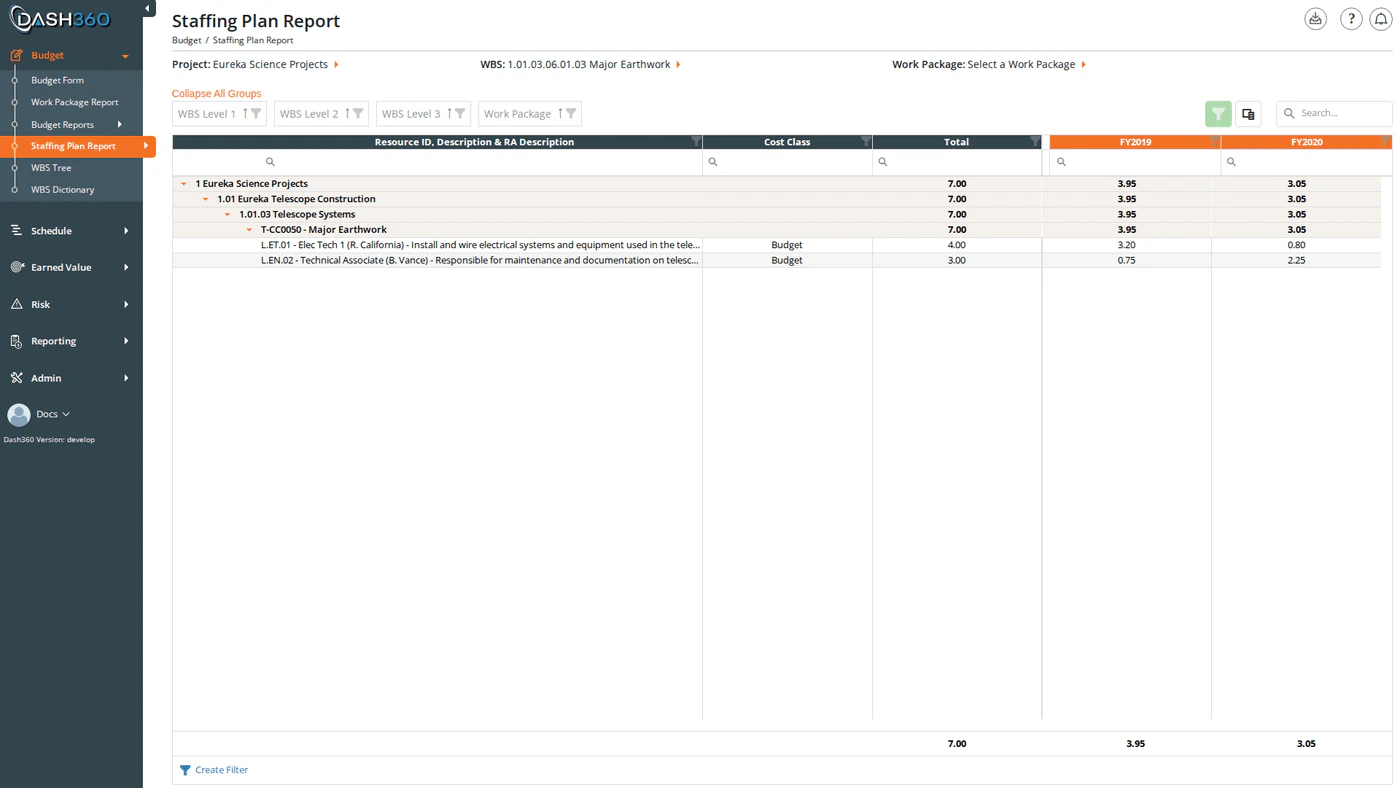
Staffing Plan Report

Overview

The Staffing Plan Report converts your resource assignments into a clear picture of workforce needs over time. Select a unit (FTEs, hours, or direct costs) and Dash360 displays your resource requirements year by year or month by month, grouped by resource code or broken out to individual assignment level. Use this report to communicate staffing requirements to stakeholders, identify periods of peak demand, and plan hiring or contracting activities. URL: /Estimating/StaffingPlanReport/Index

Prerequisites

  • A project must be selected before the report loads.

Filters

FilterDescription
ProjectRequired. Loads the WBS structure and resource data for the selected project.
WBSLimit the report to a specific WBS element. Selecting a WBS automatically filters the Work Package dropdown to show only work packages within that branch.
Work PackageFurther limit to a single work package. Populated based on the selected WBS.
UnitControls what value is shown in the time-phased cells: FTE, Hours, or Direct Cost.
ScaleSets the time granularity: Yearly (one column per fiscal year) or Monthly (one column per month).
Report TypeControls the level of detail in rows. See Report Type below.
Cost ClassWhich cost class to use (Budget, Actual, Forecast, or a configured cost set). Defaults to Budget.
CalendarAppears only when the project uses custom fiscal calendars. Selecting a calendar replaces the Scale filter; the time-phased columns reflect that calendar’s configured periods instead of standard fiscal years or months.

Display Units

UnitDescription
FTEFull-Time Equivalents: workforce need expressed as fractional headcount
HoursTotal hours required per period
Direct CostResource costs in currency (uses the configured rate file)

Time Scale

Switch between time increments using the Scale selector:
ScaleDescription
YearlyOne column per fiscal year: best for long-range planning
MonthlyOne column per month: most granular view
For projects using a custom calendar, the Scale selector is replaced by a Calendar filter. The available time periods reflect the calendar’s configured structure rather than standard fiscal years or months.

Report Type

The Report Type filter controls how resource rows are structured in the grid.
ModeDescription
Resource CodeEach resource code appears as its own row, rolled up across all work packages that use it. This is the default view; it answers “how many FTEs of Resource X does this project need?”
Resource AssignmentEach individual resource assignment is its own row, identified by a Resource Assignment ID. Use this mode to see costs or hours at the individual assignment level rather than rolled up by resource.

Columns

The grid organizes data as a hierarchy of grouped rows followed by a fixed Total column and dynamic time-phased columns.

Row Grouping

The grid groups rows by WBS level and work package. The first three WBS levels are visible by default; deeper WBS levels are hidden and can be added via the column chooser.
ColumnDescriptionDefault
WBS Level 1Top level of the WBS hierarchyVisible (grouped)
WBS Level 2Second WBS levelVisible (grouped)
WBS Level 3Third WBS levelVisible (grouped)
WBS Level 4–9Deeper WBS levelsHidden
Work PackageWork package nameVisible (grouped)
ResourceResource code with description. In Resource Assignment mode, includes the RA description as well.Visible
Resource Assignment IDThe resource assignment identifierVisible in Resource Assignment mode only
Cost ClassThe cost class for this rowVisible

Additional Columns (hidden by default)

Add these via the column chooser:
ColumnDescription
CAMControl Account Manager assigned to the work package
Resource Level 1–NIndividual levels of the resource hierarchy (if configured)
[Notebook Category]One column per configured work package notebook category
[Linked Code File Fields]One column per linked code file field configured for the project
[RA Notebook Fields]Resource assignment notebook fields

Time-Phased Columns

One column per fiscal year (Yearly mode) or per month (Monthly mode), labeled with the period identifier. In custom calendar mode, columns reflect the calendar’s configured periods. The column for the current reporting period is highlighted: the header appears in orange and the data cells in a light orange shade, making it easy to locate where the project stands today.

Total Column

A Total column (fixed on the left side of the time-phased columns) shows the sum across all periods for each row. Group rows display a subtotal for each time-phased column, summing all rows within the group.

Expanding and Collapsing Groups

Click the Expand All Groups / Collapse All Groups link above the grid to toggle all groups at once. The link label updates to reflect the current state. You can also right-click any group row header for per-group expand and collapse options.

Grid Features

FeatureDescription
Search panelFree-text search across all visible columns
Filter rowPer-column filter inputs; click Apply Filters to apply
Header filtersClick any column header to filter by specific values
Filter panelShows active filter criteria and allows clearing them
Column chooserAdd or remove columns, including hidden WBS levels, CAM, resource hierarchy, and notebook fields
Column reorderingDrag column headers to reorder
Column fixingRight-click a column header to pin it to the left
Group panelDrag columns to the group panel to add additional grouping levels
Context menuRight-click a group row to expand or collapse that group individually

Section Views

Section Views save the full grid state along with the Scale, Unit, and Report Type filter selections. When you load a Section View, both the column layout and the filter settings are restored together.
  • User views are saved per-user and visible only to you.
  • System views are created by administrators and available to all users.
To save a view: click the Save View option in the Section Views dropdown, enter a name, and click Save. The current grid state and filter settings are captured as the new view.

Exporting

Click Export to download the staffing plan as StaffingPlanReport.xlsx. The export preserves the current grouping structure, column layout, and all visible data exactly as shown in the grid.