

Overview
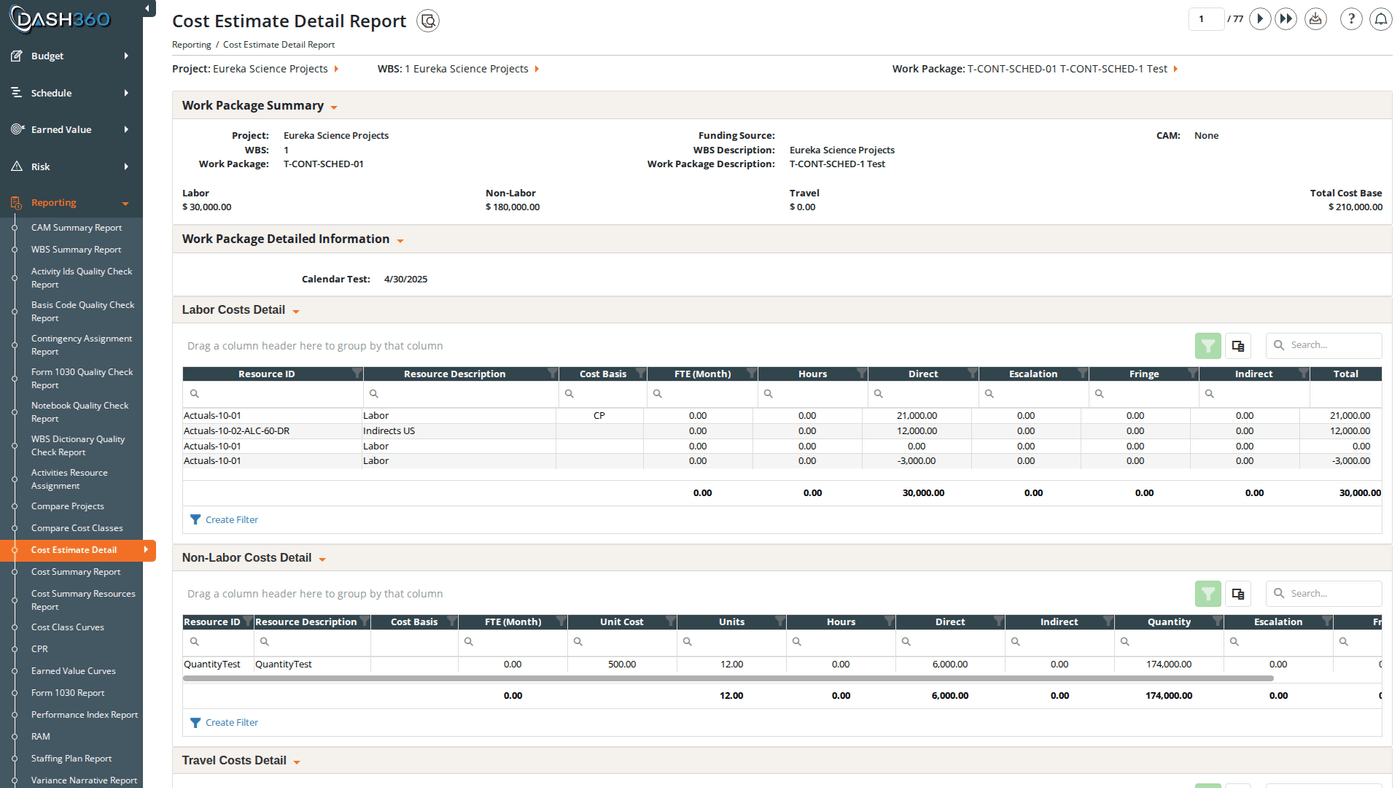
The Cost Estimate Detail report presents everything associated with a single work package’s cost estimate in one view. It covers the business context (project summary, CAM assignment, funding source), the resource cost detail (labor, non-labor, and travel grids), supporting information (notebook entries, risk/contingency, linked activities, BOE documents), and the approval chain. This report is the primary deliverable for work-package-level cost documentation and is commonly used for cost reviews, client reporting, and contract documentation packages. URL:/Reporting/CostEstimateDetailReport/Index
If the selected project does not have a resource file mapped to it, an error message appears and the report cannot load. Contact your administrator to verify the project’s resource file configuration.
Prerequisites
- Select a project, WBS, and work package. The report does not load until all three are selected.
Filters
Navigating Work Packages
The report displays one work package at a time. A counter shows your current position (e.g., “Work Package 3 of 47”). Use the navigation buttons to page through work packages:When Show Work Packages with No Costs is turned off, the paginator skips work packages with no resource assignments, so the count reflects only work packages with cost data.
Report Sections
Summary Header
Key work package metadata and a cost roll-up for the current work package: Identity fields:
Cost roll-up:
Notebook Entries
Custom fields configured by your administrator for this project. Notebook entries capture qualitative context (assumptions, justifications, and scope notes) that support the cost estimate. This section is hidden if no notebook fields have been configured.Risk Assessment and Contingency
How contingency was calculated for this work package. This section is hidden for projects configured to hide contingency. The section title uses your project’s configured contingency label (e.g., “Management Reserve”). Work package level contingency (standard mode) shows the risk assessment inputs:
Resource assignment level contingency (when configured): shows only the overall contingency percentage and the estimated contingency amount.
Resource Grids
Three grids present the cost estimate broken out by resource type:
Visible columns by default:
Hidden columns (available via column chooser):
Each grid supports grouping by resource hierarchy so you can collapse to higher-level subtotals or expand to the full resource-code detail. Subtotals and grand totals appear at every tier.
Each grid has a column chooser, search panel, filter row, header filter, filter panel, and group panel.
Schedule Activities
The schedule activities linked to this work package:
This section is hidden if no schedule activities are linked to the work package.
Supporting Documents
Basis of Estimate (BOE) links associated with this work package; clickable file or URL links. Each entry opens the attached file directly. This section is hidden if no BOE links have been added.Signature Chain
The approval chain for this work package’s estimate, showing each approval step, the approver’s signature, and the date signed. Steps without a completed signature show a blank signature area.When to Use This Report
Use Cost Estimate Detail when you need to:- Produce a cost review package: the full report includes every element needed for a formal cost review: estimate inputs, notebook justifications, risk assessment, and the signature chain.
- Verify estimate completeness: page through all work packages and check that each has resource assignments, notebook entries, and a completed signature chain.
- Client deliverable: export all work packages to a single Excel workbook for submission.
- Audit or audit preparation: the BOE links, notebook fields, and signature chain provide a complete paper trail for any work package.
Saved Views
Cost Estimate Detail supports named saved views that preserve your column layout and grouping settings across the three resource grids. Use the view selector in the toolbar to save and reload your own named views.When viewing a system view, the message “Currently viewing a system view. Changes will not be saved.” appears at the top right.
Exporting
The Excel export includes every section of the report in a professionally formatted workbook.