

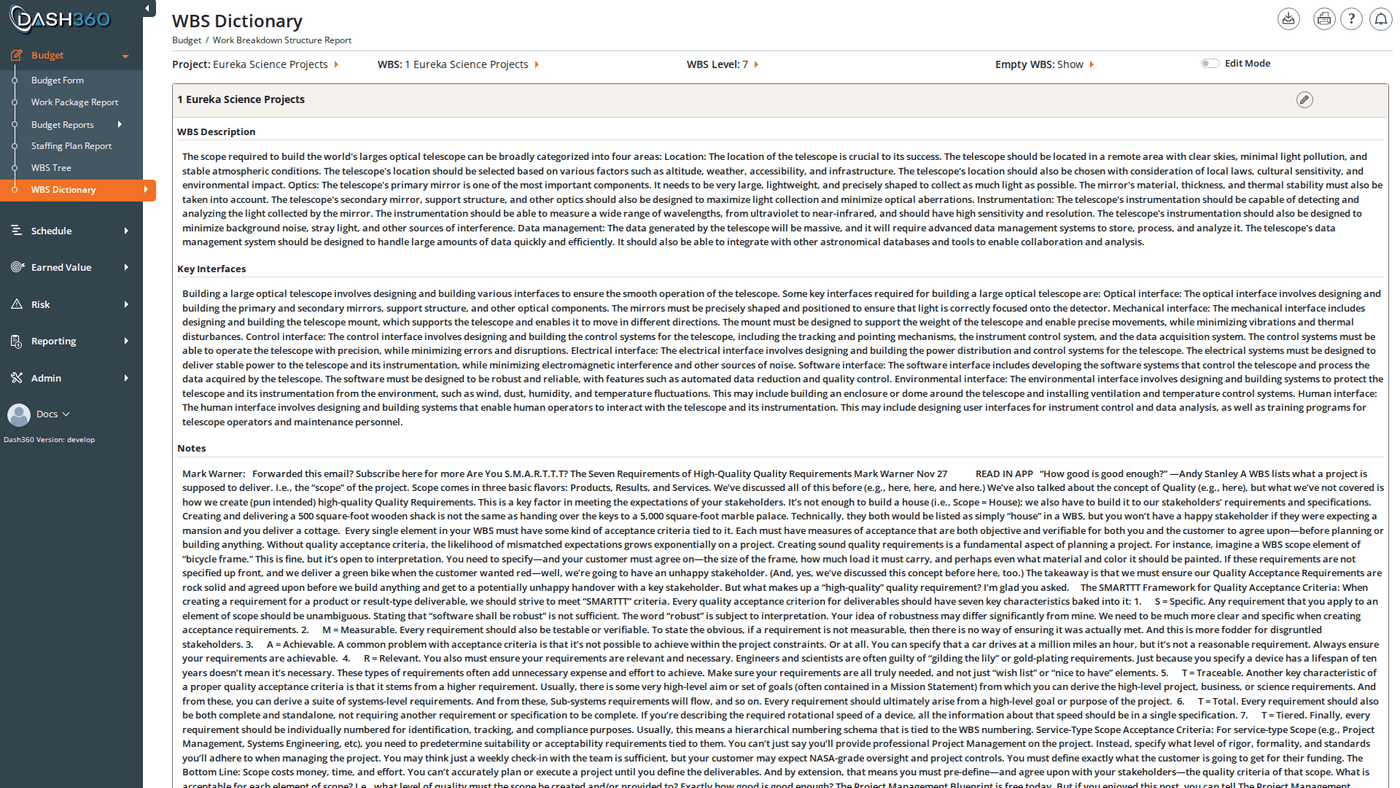
Overview
The WBS Dictionary is where you define the content of each WBS element; the descriptions, assumptions, justifications, and metadata that give meaning to your project structure. Each WBS element appears as a card showing its code and name; expand a card to view or edit its notebook fields. Use the WBS Dictionary when you need to review or update WBS descriptions across the project, export a formatted WBS document for a client or contract deliverable, or confirm that all required notebook fields are populated before a review. URL:/Estimating/WBSDictionary/Index
Prerequisites
- A project must be selected before the dictionary loads.
- Non-administrator users see only WBS elements they have permissions for. Administrators see all WBS elements regardless of permissions.
Filters
Changing the WBS or WBS Level filter immediately reloads the card list.
Display Options
Use the Show Empty WBS filter to control which elements appear:Viewing WBS Cards
Each WBS element appears as a card with the WBS code and name in the header. The card body shows all populated notebook fields for that element in read mode.- Fields are displayed with their configured label, followed by the value.
- Code file fields show both the code and its description.
- CAM fields show the user’s name, not their system ID.
- Fields with help text configured show an ⓘ icon next to the label. Hover over the icon to read the help text.
- If a WBS element has no populated notebook fields, the card body shows “No dictionary data for this WBS.”
Editing Notebook Fields
There are two ways to edit notebook fields: global Edit Mode (edit all visible cards at once) and per-card editing (edit one card at a time).Global Edit Mode
Enable Edit Mode using the checkbox in the toolbar. When Edit Mode is on:- All visible cards switch to editable form fields simultaneously.
- Pagination activates: cards are shown 10 per page. Use the First / Previous / page number input / Next / Last controls to navigate. You can also type a page number directly into the page input field.
- Save All buttons appear both above and below the card list. Clicking either saves all editable fields currently visible on the page.
Per-Card Editing
When Edit Mode is off, each card has an Edit (pencil) icon in its header. Click it to open just that card for editing without affecting the rest of the page. A Save button appears at the bottom of that card. After saving, the card returns to view mode and the Edit icon reappears.Notebook Field Types
The fields available on each card are configured by your administrator at the project level. Different projects may have different field sets and field types. The field types you may encounter when editing:
Fields with a configured help text show an ⓘ icon next to their label. Hover to see the tip.
The notebook fields available and their types are configured by your administrator in Admin > Notebooks. Different projects may have different sets of fields.