

Overview
Rate files define the dollar rates applied to resource calculations when computing cost estimates. Each resource file is optionally linked to a rate file in Resources, and the rate sets in that file are what resource calculations reference when deriving cost results from labor hours or other source values. A rate file has a three-level structure:- Rate File: the named container assigned to a resource file
- Rate Sets: named groupings within the file (e.g., “SY28 Rates”, “Fringe”); each maps to a rate name used in resource calculation formulas
- Rate Details: individual dated rate values within a rate set; multiple entries enable time-phased rates that change over a project’s life
Permissions
Administrator role required.Rate File List
The Rates page displays all rate files in two collapsible sections: Active Rate Files (linked to at least one active project through a resource file) and Inactive Rate Files (not linked to any active project). Each row shows the file name, description, an indicator of the resource files and projects using it, and action buttons.Status Indicators
Row Actions
Each rate file row has:- Rate Sets link: opens the Rate Sets inline panel for this file
- Edit (pencil) icon: edit the file name and description
- Copy icon: create a copy of the file with all rate sets and rates
- Delete (trash) icon: delete the file
- History icon: shown when history tracking is enabled (see History Tracking)
Rate File Fields
Creating a Rate File
- Click Add Rate File.
- Enter a Name and optional Description.
- Click Save and Close. The file is created empty; add rate sets next.
Copying a Rate File
Click the Copy icon on any rate file row. Enter a name for the new file and click Copy Rate File. The copy includes all rate sets and all rate detail entries. Useful for creating a new fiscal year’s rate structure from an existing one.Deleting a Rate File
Click Delete on any rate file row and confirm. The file can be deleted even if it has rate sets; all rate sets and rate details are removed. If the rate file is referenced by any resource file, remove that assignment in Resources first.Rate Sets
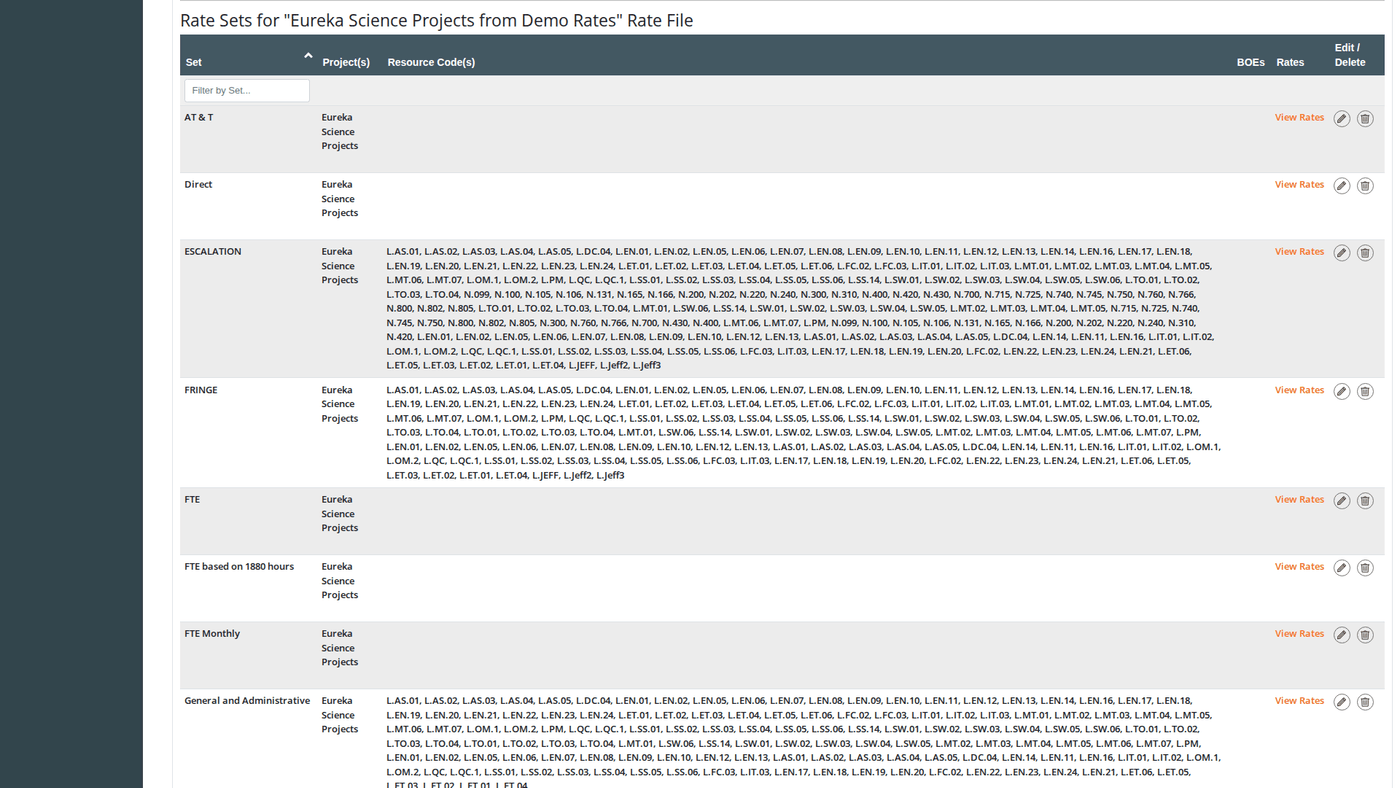
Rate sets are the named rate groupings within a rate file. In resource calculation formulas, the “Rate Set” field selects which rate set to apply as a multiplier to source results. For example, a “Fringe” rate set would contain the dated fringe rates applied to labor hours.Viewing Rate Sets
Click the Rate Sets link on any rate file row to expand the Rate Sets panel below it. The panel shows all rate sets defined in that file.Rate Sets Grid Columns
Rate Set Fields
When adding a new rate set, the form is titled “Add a Rate Set (and initial rate)”: you must provide the first rate at the same time as the rate set:When editing an existing rate set, the Rate Date and Rate fields are hidden; you manage rates separately through the Rate Details panel. Only the Name and BOE files are editable on the rate set itself.
BOE Files
Each rate set can have multiple BOE (Basis of Estimate) files attached. In the Add/Edit Rate Set modal:- A blank upload row is always shown for adding a new file
- Existing files appear as “Existing File” links (open the file from S3) with a “Remove this File” checkbox to delete them on save
- Click Add another file to add additional upload rows
- Each file can have its own BOE Comment (free-text explanation)
Adding a Rate Set
- In the Rate Sets panel, click Add Rate Set.
- Enter a Name for the rate set.
- Enter the initial Rate Date and Rate (required for the first rate entry).
- Optionally upload one or more BOE Files with comments.
- Click Save and Close.
Editing a Rate Set
Click the Edit icon on any rate set row. You can update the name and manage BOE files. Rate values are managed separately through the Rate Details panel.Deleting a Rate Set
Click Delete on a rate set row. This removes the rate set and all of its rate detail entries.Rate Details
Rate details are the individual dated rate values within a rate set. Multiple rate detail entries allow rates to change over time; Dash360 applies the appropriate rate based on the period date of each resource assignment.Viewing Rate Details
In the Rate Sets panel, click View Rates on any rate set row to expand the Rate Details panel below it.Rate Details Grid Columns
Rate Detail Fields
Adding a Rate Detail
- In the Rate Details panel, click Add Rate.
- Select the Rate Set from the dropdown.
- Enter the Rate Date and Rate.
- Click Save and Close or Save and Add Another.
Editing a Rate Detail
Click the Edit icon on any rate row. The same modal opens pre-filled.Deleting a Rate Detail
Click Delete on a rate row.History Tracking
When history tracking is enabled (controlled by theEnableHistoryTracking registry setting), a History icon appears on each rate file row. Click it to see a full audit trail of all changes to the rate file, rate sets, and rate detail entries; with timestamps and the user who made each change.
Shared Rate Files
A rate file can be used by multiple projects (through shared resource files). When a rate file is shared:- The Shared icon appears on the file row
- The Add Rate Set and Add Rate buttons are hidden; structural changes to shared files are blocked
- History and view access remain available
If you need to modify rates for one project without affecting others, copy the rate file to create a project-specific version, then update the resource file assignment in Resources to use the new copy.
How Rates Connect to Calculations
Rate sets are referenced by resource calculations in Resources. When a resource calculation row uses a rate-based formula:- The calculation selects a Rate Set by name from the rate file linked to the resource file
- The source results (e.g., Labor Hours) are multiplied by the rate value in effect for each time period
- The result is the derived cost for that resource in that period