

Overview
Resource files define the catalog of resources available for cost estimating. When a CAM adds a resource assignment on the Budget Form, the resource codes they can select come from the resource file assigned to the project. Each resource file also defines Resource Results (the cost and hour metrics produced by each resource) and Resource Calculations (the formulas that derive those results from rate tables). Each project is assigned one resource file in Project Settings. That file’s resource codes are what users see when adding or editing resource assignments.Permissions
Administrator role required.Resource File List
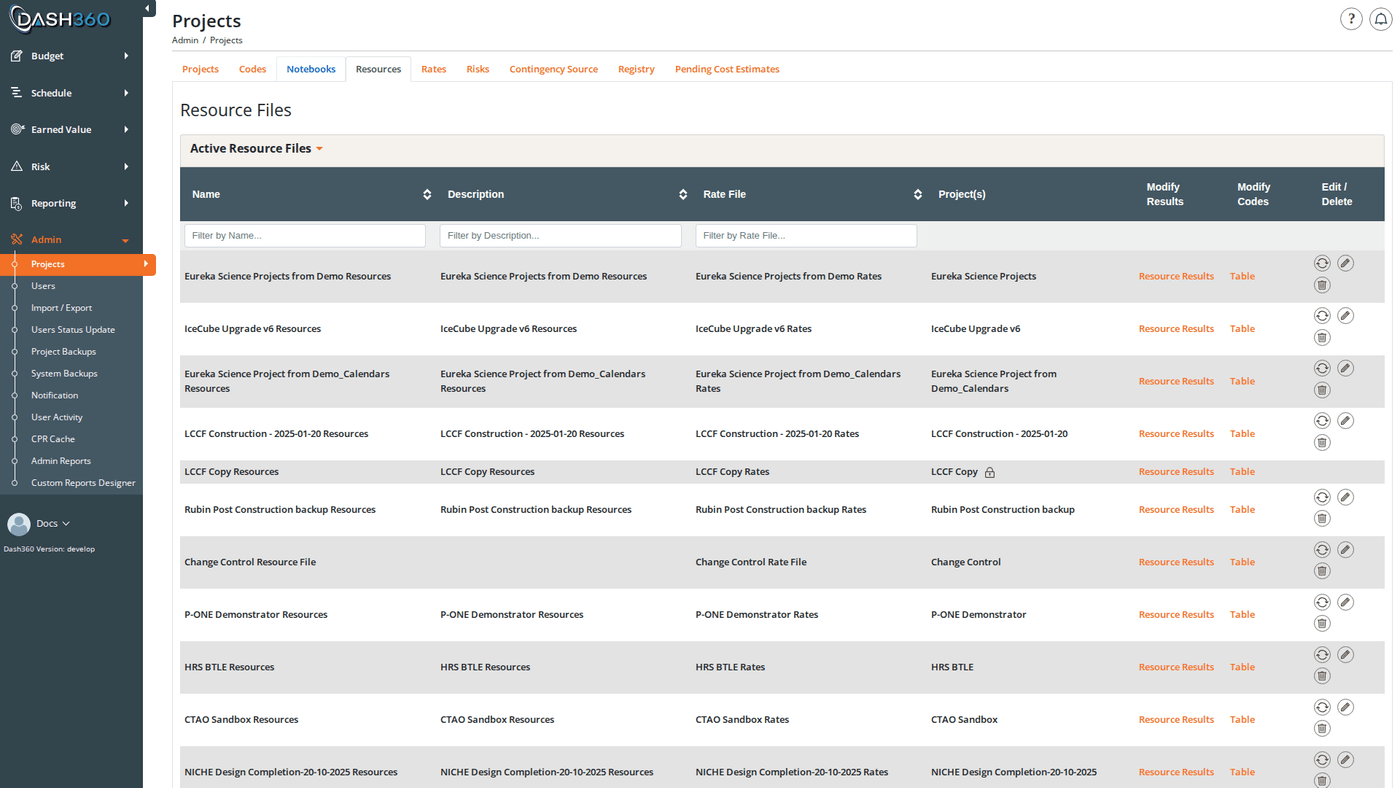
The Resources page displays all resource files in two collapsible sections: Active Resource Files (assigned to at least one active project) and Inactive Resource Files (not assigned to any active project). Each row shows the file name, an optional description, assigned projects, and action buttons. Status indicators on the row include:
The Modify column on each row provides links to:
- Resource Codes (Table): opens the table view of resource codes
- Resource Codes (Tree): opens the hierarchical tree view (only for hierarchical files)
- Resource Results: opens the resource results panel for this file
Resource File Fields
Creating a Resource File
- Click Add Resource File.
- Enter a Name and optional Description.
- Set Type to Flat or Hierarchical. If hierarchical, enter the Separator character.
- Optionally select a Rate File.
- Use the dual-list selectors to add Linked Code Files for codes and/or results.
- Click Save and Close. The file is created empty; add resource codes next.
Editing a Resource File
Click the Edit (pencil) icon on any resource file row.Copying a Resource File
Click the Copy icon on any row. Enter a name for the new file and optionally a name for a new rate file to create alongside it. The copy includes all resource codes, resource results, and resource calculations.Deleting a Resource File
Deleting a resource file removes all of its resource codes, resource results, and calculations. The file cannot be deleted if it is assigned to any project; remove it from all project assignments first.Resource Codes
Each resource code within a file represents a billable resource category. Within a resource file, click Resource Codes (Table) to open the table view, or Resource Codes (Tree) for a visual hierarchy view (hierarchical files only).Resource Code Fields
Resource Code Table Grid
The table grid shows all codes in the file with these columns:Adding a Resource Code
- Click Add Resource Code.
- Enter the Resource ID and Description.
- Select the Resource Type.
- For hierarchical files, optionally select a Parent code.
- Fill in any linked code file entry dropdowns.
- Click Save and Close or Save and Add Another.
Editing a Resource Code
Click the Edit icon on any code row. The same modal opens pre-filled.Deleting a Resource Code
Click the Delete icon on a code row. If the code is used by any resource assignments, a confirmation modal lists all affected projects, WBS elements, work packages, and cost classes. The deletion can proceed even if the code is in use; affected resource assignments are removed along with the code.Bulk Operations
Select multiple codes using the checkboxes, then:Resource Code Tree View (Hierarchical Files)
For hierarchical resource files, click Resource Codes (Tree) to open a D3.js interactive tree diagram.Tree Interactions
When a code is reparented via drag-and-drop, its Resource ID is automatically rebuilt using the new parent’s path + the separator + the original child portion.
If the resource file is assigned to multiple projects (shared), reparenting and ID changes are restricted. You can view and expand/collapse the tree but structural changes are blocked.
Resource Results
Resource Results define the named output metrics for a resource; for example, “Labor Hours,” “Direct Cost,” or “Overhead.” They appear as columns in the Budget Form’s resource assignment grids and in cost reports. Click Resource Results on any resource file row to open the results panel.Resource Result Fields
Adding and Editing Resource Results
Click Add Resource Result in the results panel. The modal opens with the fields above. Click the Edit icon on any result row to modify it.Deleting a Resource Result
A result cannot be deleted if it is referenced by any resource calculation. Remove all calculations using the result first, then delete it.Resource Calculations
Resource calculations define the formulas that produce each Resource Result for a given resource code. They determine how Dash360 calculates cost and hour values in resource assignments. Click Calculations on any resource code row to open the Resource Calculations modal for that code.How Calculations Work
Each row in the calculations table defines one output result and how it is derived:
The first row in a resource code’s calculation table is always Direct Entry (no formula; the source value). Subsequent rows can apply rates from the rate file to produce derived results.
Resource Calculation Fields
Copying Calculations
Use the Copy Resource Calculations button in the modal to copy all calculations from another resource code in the same file to the current code. Existing calculations are replaced. You can also copy calculations in bulk using Bulk Edit on the resource code table; select multiple target codes and specify the source code to copy from.If you select “Rateset Same Name as Resource Code ID” as the rate set, Dash360 looks for a rate set in the rate file whose name exactly matches the resource code’s ID. If no matching rate set exists, an error is shown.
Format 1030 Mappings
When the Show-Format1030 registry setting is enabled, a Form 1030 code classification section appears for the resource file. This maps each resource code + resource result combination to a Form 1030 cost element. Mappings are managed through the 1030 Mappings panel on the resource file. Add a mapping by selecting a resource code, its result, and the Form 1030 code that applies. When a resource result has a Format 1030 code assigned, all resource codes that calculate that result automatically receive the mapping.History Tracking
When history tracking is enabled (controlled by theEnableHistoryTracking registry setting), a History icon appears on each resource file row. Click it to see a full audit trail covering all changes to the resource file and all of its codes, results, and calculations; with timestamps and the user who made each change.
Shared Resource Files
A resource file can be assigned to multiple projects. When shared:- The Shared icon appears on the file row
- Resource code IDs and descriptions cannot be changed
- Hierarchical structure (reparenting) is locked
- Resource results and calculations can still be edited
If you need to modify resource codes for one project without affecting others, copy the resource file first to create a project-specific version, then reassign the project to use the copy in Project Settings.